“Should we use WordPress or build something custom?” is usually asked at the wrong moment: after a quote arrives that seems too high or too low. The honest answer is that both are good choices for different businesses, and the wrong one costs you either in rebuild fees or in years of workarounds.
This guide explains what each option really means, where each one wins, what both cost in 2026, and a simple checklist to decide for your own growing business.
The short answer
- **Choose WordPress** if your site is mainly pages, blog posts, landing pages and forms, and your team needs to edit content without a developer.
- **Choose a custom build** if your website is part of how you deliver the service: logins, dashboards, bookings with business rules, pricing calculators, portals or integrations that a plugin cannot handle cleanly.
- **Consider a hybrid** if you want WordPress for content and custom code for the parts that are your product.
Most growing businesses start on the first, add pieces of the third, and only need the second when the website becomes software.
What “custom” actually means
The word gets used loosely, so it helps to separate three things:
- **WordPress with a theme.** A ready-made or premium theme, adjusted with your branding and content. Fast and affordable.
- **WordPress with a custom design.** A theme built for your brand, still managed in WordPress. Most “custom WordPress” quotes are this.
- **Custom-coded website or web app.** Built with a framework such as React or Next.js and a backend or headless CMS. Every screen and rule is code written for you.
When two agencies quote very different prices for “a custom website”, they are often quoting different rows of this list. Ask which one you are getting.
WordPress vs custom: side by side
| Factor | WordPress | Custom build |
|---|---|---|
| Upfront cost | Lower | Higher |
| Time to launch | 2 to 6 weeks | 6 to 16 weeks |
| Editing content | Easy, familiar editor | Depends on the admin or CMS you build |
| Unique features | Limited to plugins and theme code | Anything you can specify |
| Performance | Good if kept lean, slow if plugin heavy | Excellent when built well |
| Security upkeep | Regular core and plugin updates | Fewer moving parts, but needs a developer |
| Hiring developers | Very large talent pool | Depends on the stack chosen |
| Long-term flexibility | Fine for content, harder for complex logic | High, if the code is well documented |
When WordPress is the right choice
WordPress powers a very large share of the web. W3Techs tracks it as the most used content management system by a wide margin. That popularity is useful: themes, plugins, hosting and developers are everywhere.
It is the right choice when:
- Your site is mainly service pages, a blog, case studies and contact forms
- Marketing needs to publish landing pages without waiting for a developer
- You need SEO tools, forms, a simple shop or bookings that existing plugins handle well
- Your budget is under about $8,000 and launch speed matters
- You want to be able to switch agencies easily later
This blog itself runs on WordPress for exactly those reasons: it is content, it changes daily, and the editor is familiar.
When a custom build is the right choice
Custom starts to pay for itself when the website does real work for the business rather than just describing it:
- **Customer logins and dashboards**, for example clients checking orders, students tracking courses or members managing plans
- **Complex bookings** with rooms, staff, equipment and rules that plugins only half support
- **Portals and marketplaces** with many user types, listings, moderation and payments
- **Deep integrations** with your CRM, ERP, accounting or your own APIs
- **Performance as a competitive edge**, such as large catalogues or heavy search
- **A product**, where the web app is what you sell
If you find yourself listing ten plugins to make one feature work, that is usually the signal. Each plugin is another update, another conflict and another security risk.
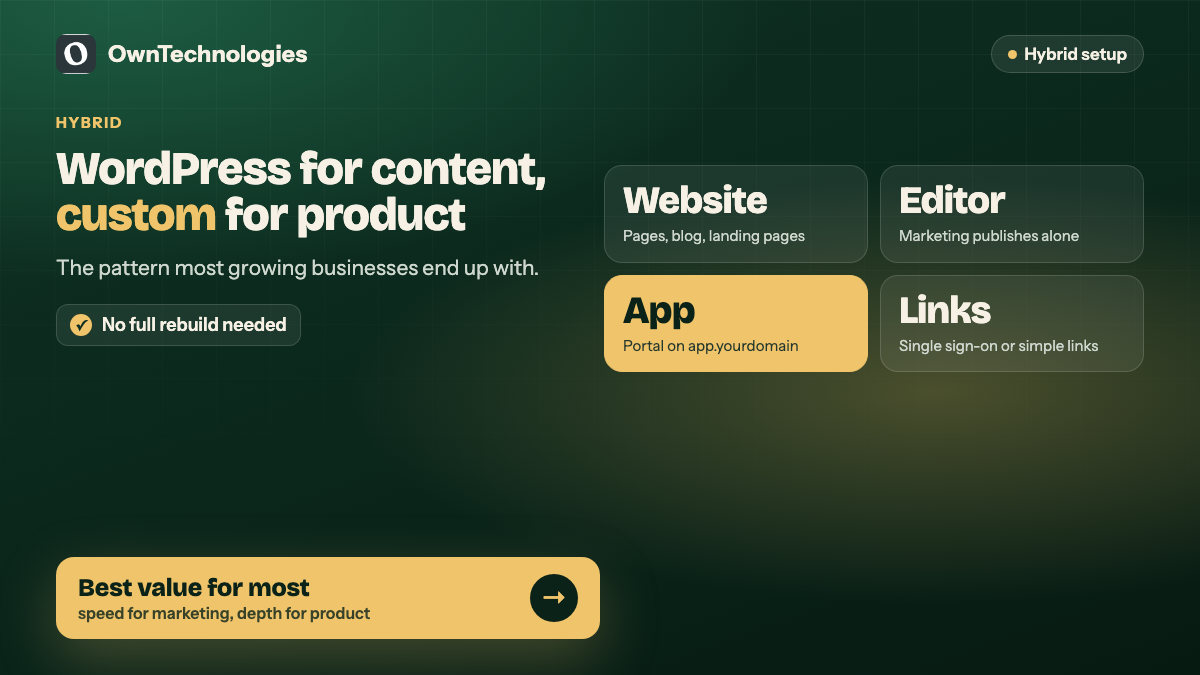
The hybrid option: WordPress for content, custom for the product
Many growing businesses do not need to choose. Two common patterns work well:
- **Marketing site on WordPress, app on a subdomain.** The public site, blog and landing pages stay in WordPress. The client portal or booking app is custom and lives at app.yourdomain.com.
- **Headless WordPress.** WordPress is used only as the content editor, and a custom front end displays the content. You keep the familiar editor and get a faster, more flexible site. It costs more than a normal WordPress site and needs a developer for layout changes.
The first pattern is the most common and usually the best value. Marketing keeps its speed and the product gets proper engineering.
The hidden costs on each side
WordPress
- **Plugin licences.** Premium plugins for forms, SEO, backups, security and page building often add $100 to $500 a year.
- **Updates.** Core, theme and plugin updates need to be applied and tested regularly. The official WordPress hardening guide makes updates the first line of defence.
- **Plugin bloat.** Every plugin added “just for one thing” slows the site and widens the attack surface.
- **Page builder lock-in.** Some heavy page builders make content hard to move if you ever change themes.
Custom build
- **Higher upfront cost and longer timeline.**
- **Developer dependency.** Content changes outside the admin you build need a developer.
- **Documentation risk.** Poorly documented custom code is expensive for the next team to pick up. Insist on documentation and repository access from day one.
- **Admin panel scope.** If the admin is underbuilt, your team will hate editing content. Budget for it properly.
Speed and security in practice
Neither option is automatically fast or secure. A lean WordPress site on decent hosting with a handful of well-maintained plugins can be very fast. A plugin-heavy WordPress site on cheap hosting is usually slow. A custom site can be the fastest of all, or slow if it was built carelessly.
Security follows the same pattern. Most WordPress problems come from outdated plugins and weak passwords, which is a maintenance issue rather than a platform flaw. We cover the basics in our website security checklist for small businesses and the speed side in website speed quick fixes.
What each option costs in 2026
These are planning ranges for an experienced offshore or hybrid team, not quotes.
| Option | Typical scope | Cost | Timeline |
|---|---|---|---|
| WordPress with a theme | 5 to 10 pages, blog, forms, basic SEO | $1,500 to $4,000 (around 1.25 to 3.4 lakh INR) | 2 to 4 weeks |
| WordPress with custom design | Branded design, custom templates, integrations via plugins | $3,000 to $8,000 (around 2.5 to 6.7 lakh INR) | 4 to 6 weeks |
| Custom-coded website | Framework front end, headless CMS or custom admin | $6,000 to $15,000 (around 5 to 12.5 lakh INR) | 6 to 10 weeks |
| Custom web portal or app | Logins, dashboards, workflows, integrations | $15,000 to $45,000 (around 12.5 to 37 lakh INR) | 10 to 16 weeks |
Running costs matter too. WordPress hosting for a small business is usually $10 to $60 a month plus plugin licences. Custom sites often need more capable hosting. Either way, a maintenance plan of roughly $40 to $250 a month covers updates, backups and monitoring. For the full breakdown, see our custom website development cost guide and what a website maintenance plan includes.
Moving from WordPress to custom later
Starting on WordPress does not lock you in. When a business outgrows it, the usual path is:
- Keep the content site on WordPress
- Build the new feature (portal, booking engine, dashboard) as a custom app
- Connect the two with single sign-on or simple links
- Move the marketing site to custom only if speed or design genuinely demands it
Keep your URLs the same when you migrate pages, or redirect each old URL to its new home, so you do not lose search rankings. Google explains how it handles moved pages in its guidance on canonical URLs. If you are unsure whether you need a refresh or a full rebuild, read website redesign vs rebuild.
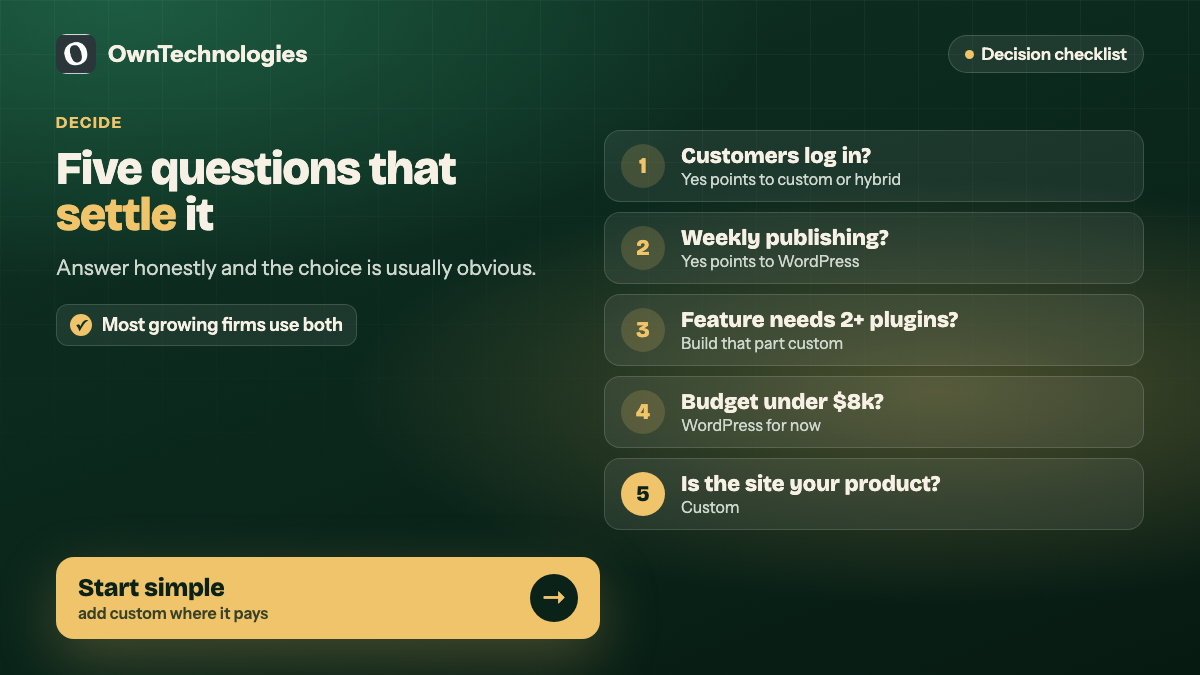
A five-question checklist
Answer these honestly and the choice usually becomes obvious:
- **Do customers log in to do something on your site?** Yes points to custom or hybrid.
- **Will marketing publish pages every week?** Yes points to WordPress or headless WordPress.
- **Does a key feature need more than two plugins to work?** Yes points to custom for that feature.
- **Is your budget under $8,000?** Yes points to WordPress for now.
- **Is the website itself something you sell or charge for?** Yes points to custom.
Frequently Asked Questions
Yes, for most content-led websites. Service pages, blogs, landing pages, forms and simple shops work well on WordPress when the site is kept lean and maintained.
When customers log in, when bookings or pricing follow complex business rules, when you need deep integrations with your CRM or ERP, or when the website is itself a product.
In 2026 a WordPress site typically costs $1,500 to $8,000, a custom-coded website $6,000 to $15,000, and a custom web portal $15,000 to $45,000, with an experienced offshore or hybrid team.
Not automatically. Most WordPress issues come from outdated plugins and weak passwords. A well-maintained WordPress site is secure, and a poorly built custom site is not.
Headless WordPress uses WordPress only as the content editor while a custom front end displays the content. You keep the familiar editor and gain speed and design freedom, at a higher build cost.
Yes. Most businesses keep the marketing site on WordPress and add custom apps for portals or bookings, migrating the main site only if it genuinely needs it.
Final Thoughts
WordPress and custom builds are not rivals. WordPress is the best tool for content that changes often. Custom code is the right tool when your website does work that is specific to your business. Many growing companies use both, and that is usually the sweet spot.
Not sure which fits your plans? Our website development team builds both CMS-based sites and custom web portals, our CRM team handles the integrations behind them, and our SEO team protects your rankings during any move. Book a free consultation and we will recommend the simplest option that will still fit you in two years.