Your website feels slow, a customer mentioned it, or PageSpeed Insights just gave you a red score. The usual advice is “rebuild the site”, which means weeks of work and a five-figure quote.
Most of the time you do not need that yet. This guide covers 10 website speed fixes that each take under a day, often under an hour, what each one improves, and the signs that tell you quick fixes are no longer enough.
Why Quick Speed Fixes Come Before a Rebuild
A slow website is rarely slow for one big reason. It is usually slow because of ten small ones: a 4 MB hero photo, a chat widget that loads before the headline, three plugins nobody uses, and no caching.
Each of those is cheap to fix on its own. Together they often move a site from a failing score to a passing one without touching the design. We covered why speed matters for rankings and sales in how website speed affects SEO and conversions. This post is the practical follow-up: what to actually change, in what order, and how long it takes.
Measure First: Your 15-Minute Speed Baseline
Before you change anything, record where you are. Run your homepage and your most important landing page through Google PageSpeed Insights and note the mobile results, because mobile is where most sites fail.
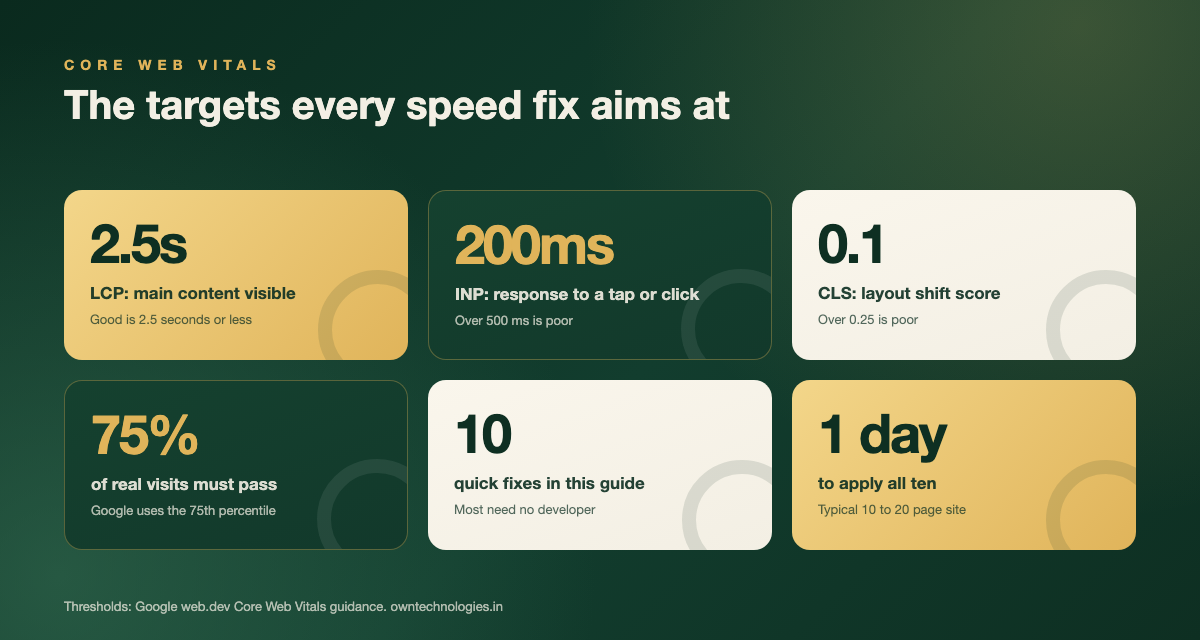
Focus on the three Core Web Vitals. Google publishes the thresholds on web.dev, and a page passes when at least 75 percent of real visits meet the “good” mark.
| Metric | What it measures | Good | Poor |
|---|---|---|---|
| Largest Contentful Paint (LCP) | How fast the main content (usually the hero image or headline) appears | 2.5 seconds or less | Over 4 seconds |
| Interaction to Next Paint (INP) | How quickly the page responds to a tap, click, or key press | 200 ms or less | Over 500 ms |
| Cumulative Layout Shift (CLS) | How much the layout jumps around while loading | 0.1 or less | Over 0.25 |
Save a screenshot of each result. When you finish the fixes below, run the same pages again so you can see exactly what improved.
The 10 Website Speed Fixes at a Glance
| # | Fix | Time needed | Main metric it helps | Needs a developer? |
|---|---|---|---|---|
| 1 | Compress images and convert to WebP | 1 hour | LCP | No |
| 2 | Serve correctly sized images | 30 to 60 minutes | LCP | Sometimes |
| 3 | Lazy-load images and embeds below the fold | 20 minutes | LCP | No |
| 4 | Replace autoplay sliders and hero videos | 30 minutes | LCP, INP | No |
| 5 | Remove unused plugins and apps | 1 hour | INP, LCP | No |
| 6 | Delay chat widgets, pixels, and heatmaps | 1 to 2 hours | INP | Sometimes |
| 7 | Limit and preload web fonts | 45 minutes | LCP, CLS | Sometimes |
| 8 | Turn on page caching | 30 minutes | LCP | No |
| 9 | Put the site behind a CDN | 30 to 60 minutes | LCP | No |
| 10 | Stop layout shift (image sizes, banner space) | 45 minutes | CLS | Sometimes |
Fixes 1 to 4: Images and Media
Images are the heaviest thing on most business websites, so this is where you get the biggest win for the least effort.
1. Compress images and convert them to WebP
Photos straight from a phone or a stock site are often 3 to 6 MB each. Compressed and saved as WebP, the same photo usually looks identical at a fraction of the size. On WordPress, an image optimisation plugin can bulk-convert your whole media library. On Shopify and Wix, most images are converted automatically, but anything uploaded inside a theme section or as a background is worth checking.
2. Serve images at the size they are shown
A 4000-pixel-wide photo displayed in a 400-pixel card still downloads at 4000 pixels. Resize images to roughly twice their display width (for sharp phone screens) and no more. Modern themes generate several sizes automatically; older or custom-coded themes often do not, which is where a developer helps.
3. Lazy-load what sits below the fold
Images, YouTube embeds, and maps further down the page do not need to load before the visitor scrolls. Lazy-loading delays them until they are needed. One warning: never lazy-load the hero image at the top of the page, because that makes your LCP worse, not better.
4. Replace autoplay sliders and hero videos
Rotating sliders load four or five large images and a script before anything is usable, and most visitors never see past slide one. A single strong image with one headline and one button is faster and usually converts better. If you love the video, show a poster image and play it only when someone taps.
Fixes 5 to 7: Plugins, Scripts, and Fonts
This group is about the code your site loads that the visitor never asked for. It is where slow tap response (INP) usually comes from.
5. Remove unused plugins and apps
Every plugin or app can add its own scripts and styles to every page. Make a list of what is installed and ask one question per item: did we use this in the last 90 days? Typical candidates to remove:
- Old popup, review, or countdown tools from past campaigns
- Two plugins doing the same job (two SEO plugins, two form builders)
- Social share bars and Instagram feeds nobody clicks
- Page builder add-on packs where you use one widget out of fifty
Take a full backup first, deactivate in small batches, and check your key pages and forms after each batch.
6. Delay chat widgets, pixels, and heatmaps
Live chat, Facebook and Google pixels, heatmap tools, and review badges are often the biggest drag on a page. You do not need to remove them, just stop them from loading first. Most can be set to load after the page is interactive or after the first scroll. Tag Manager and most caching plugins have a “delay JavaScript” option that does this without editing code. Test your forms and tracking afterwards so you do not lose conversion data.
7. Limit and preload your web fonts
Each font family and weight is a separate download. A site using three families in five weights each is loading fifteen files before text looks right. Cut to one or two families and three weights, host them on your own domain if your theme allows it, and preload the main one so headlines appear quickly.
Fixes 8 to 10: Caching, CDN, and Layout Stability
8. Turn on page caching
Without caching, a WordPress or PHP site rebuilds every page from the database for every visitor. With caching, it serves a ready-made copy. Many managed hosts include caching that is simply switched off. If yours does not, a caching plugin costs between free and about $50 (around 4,200 INR) a year.
9. Put the site behind a CDN
A content delivery network stores copies of your images, scripts, and pages on servers around the world, so a visitor in Toronto is not waiting on a server in Mumbai. Free CDN plans exist and cover most small business sites. Setup is usually a DNS change, which is why it is worth doing carefully and at a quiet time of day.
10. Stop the layout from jumping
If buttons move just as someone goes to tap them, your CLS score suffers and so does trust. The usual causes are images without width and height set, cookie or offer banners that push content down, and ads or embeds that load late. Set image dimensions, reserve space for banners, and make the cookie notice overlay the page instead of pushing it.
How Long the Whole Day Takes
Here is how a typical 10 to 20 page business website splits across the day. Times assume a WordPress or Shopify site and someone comfortable in the admin panel.
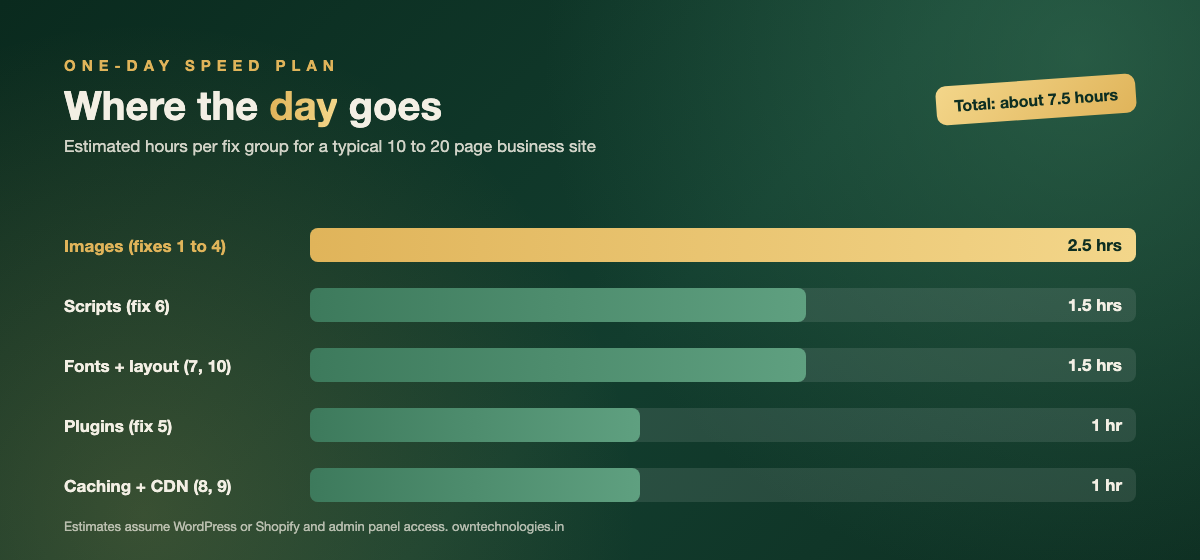
If you would rather hand it off, a developer will typically charge $300 to $800 (around 25,000 to 67,000 INR) to do all ten, test them, and report before and after scores. That is a fraction of a rebuild, and it tells you quickly whether a rebuild is even needed.
A One-Day Website Speed Plan, Hour by Hour
Order matters. Do the safe, high-impact work first and leave anything that touches DNS or tracking for when you can test properly.
- 9:00: Full backup, then record your PageSpeed baseline for 2 to 3 key pages.
- 9:30: Images: compress, convert, resize, lazy-load below the fold (fixes 1 to 3).
- 12:00: Swap the slider or hero video for a single image (fix 4).
- 13:30: Plugin and app clean-up in small batches (fix 5).
- 14:30: Delay chat, pixels, and heatmaps, then test forms and tracking (fix 6).
- 16:00: Fonts and layout shift (fixes 7 and 10).
- 17:00: Caching and CDN (fixes 8 and 9), clear all caches, re-run PageSpeed.
Field data in Search Console takes around 28 days to fully reflect changes, because it is based on real visits. The lab score in PageSpeed Insights updates immediately, so use that to confirm each fix worked.
What Quick Fixes Cannot Solve
Sometimes you do all ten and the mobile score barely moves. That usually points to a structural problem rather than a settings problem:
- Cheap shared hosting: if the server takes over a second just to respond, nothing on the page can fix that. Moving to better hosting often costs $10 to $40 (around 840 to 3,400 INR) a month.
- A bloated theme or page builder: some multipurpose themes load code for every possible layout on every page.
- Years of patches: custom code added by different freelancers, often loading the same library three times.
- A site that was never built for mobile: desktop layouts squeezed onto phones fail CLS and INP no matter what you cache.
If that sounds familiar, compare the options in our website redesign cost guide, and check the other usual suspects in common website mistakes that hurt SEO. A lean rebuild by a website development team typically takes 3 to 6 weeks depending on scope, and speed should be written into the brief as a measurable target, not left as a hope.
How Speed Fits Into Your SEO
Google says page experience, including Core Web Vitals, is one of many signals its ranking systems use, as explained in its Search Central documentation. Speed will not rescue thin content, but between two similar pages it helps the faster one, and it reduces the visitors who leave before your page even appears.
That is why we treat speed as part of every SEO engagement rather than a separate project. A faster site makes every other marketing rupee or dollar work a little harder.
Frequently Asked Questions
Start with images: compress them, convert to WebP, resize them to their display size, and lazy-load anything below the fold. Then remove unused plugins, delay chat widgets and tracking scripts, limit fonts, turn on caching, and add a CDN. Together these usually fit into one working day.
Aim to pass all three Core Web Vitals on mobile: Largest Contentful Paint of 2.5 seconds or less, Interaction to Next Paint of 200 milliseconds or less, and Cumulative Layout Shift of 0.1 or less. These matter more than the single PageSpeed number.
Doing the fixes yourself costs little beyond your time, since free CDN plans and low-cost caching tools exist. A developer typically charges $300 to $800 (around 25,000 to 67,000 INR) to apply all ten quick fixes and report before and after scores.
Phones have slower processors and often slower connections, so heavy images, sliders, and third-party scripts hurt them far more. Mobile is also where Google measures most visits, which is why mobile scores are usually lower.
If you have applied the quick fixes and the mobile score still fails, the cause is usually slow hosting, a bloated theme, years of patched code, or a layout that was never built for mobile. At that point a lean rebuild is often cheaper than more patching.
Final Thoughts
Website speed is mostly a list of small, boring fixes done in the right order. Do the images first, tame the scripts, switch on caching, and measure before and after. For most business sites, that one day is the difference between failing and passing Core Web Vitals.
Not sure which fixes your site needs? Ask OwnTechnologies for a free SEO audit. We will run your key pages, list the exact speed fixes in priority order, and tell you honestly whether quick fixes or a rebuild is the better spend. You can see the kind of sites we build in our portfolio.