Your website feels old, leads have slowed down, and someone on your team says “we just need a redesign.” Someone else says the whole thing should be thrown out and rebuilt. Both options cost real money, and picking the wrong one is expensive either way.
This guide explains the real difference between a website redesign and a website rebuild, gives you 2026 cost ranges for each, and walks you through a simple scorecard so you can decide in about ten minutes, before you ask anyone for a quote.
Website Redesign vs Rebuild: The Short Answer
A redesign changes what visitors see: layout, visuals, copy, navigation, and user experience. The platform and code underneath stay mostly the same. A rebuild replaces what sits underneath: the CMS, the codebase, the hosting setup, and usually the design too.
Think of it like a shop. A redesign is new paint, new shelves, and a better layout. A rebuild is new wiring, new plumbing, and a stronger foundation. If the wiring is fine, paint is the smart spend. If the wiring keeps tripping, new paint will not help.
| Factor | Redesign | Rebuild |
|---|---|---|
| What changes | Design, layout, copy, UX, on-page SEO | Platform, code, hosting, integrations, plus design |
| Typical cost (USD) | $6,000 to $18,000 (around 5 to 15 lakh INR) | $20,000 to $45,000 (around 16.5 to 37 lakh INR) |
| Timeline | 4 to 8 weeks | 8 to 14 weeks |
| SEO risk | Low, URLs usually stay the same | Medium to high unless redirects are planned |
| Fixes speed and security | Partly | Yes, from the ground up |
| Best for | Sites that work but look dated or convert poorly | Sites that are slow, fragile, hard to edit, or cannot grow |
What a Website Redesign Actually Changes
A proper redesign is more than a new theme. Done well, it is a conversion project. The team studies how visitors move through your site today, where they drop off, and what makes them enquire, then designs around that.
- Visual design: new colours, typography, imagery, and a layout that matches your brand today, not five years ago.
- User experience: clearer navigation, shorter forms, better mobile layouts, and calls to action placed where people actually look.
- Content: rewritten service pages, updated proof points, and cleaner page structure.
- On-page SEO: titles, headings, internal links, and image alt text rebuilt around the keywords you want to rank for.
What a redesign does not change is the engine. If your site runs on a CMS that is five major versions behind, a redesign puts a new body on an old engine. That is fine if the engine is healthy. It is a waste of money if it is not.
What a Website Rebuild Actually Changes
A rebuild starts from a clean foundation. Your content, brand, and search rankings are carried over, but the technology underneath is replaced. In most rebuilds we see four changes:
- New platform: moving from an old or heavily hacked CMS to a current WordPress build, a headless setup, or a custom application.
- Clean code: removing years of plugin patches and one-off fixes that slow the site down and break on every update.
- Modern hosting: a faster server, a CDN, automated backups, and proper SSL.
- Proper integrations: forms that push leads straight into your CRM, booking tools, payment gateways, or WhatsApp.
A rebuild almost always includes a redesign, because rebuilding the engine and keeping a dated look rarely makes sense. That is why it costs more and takes longer.
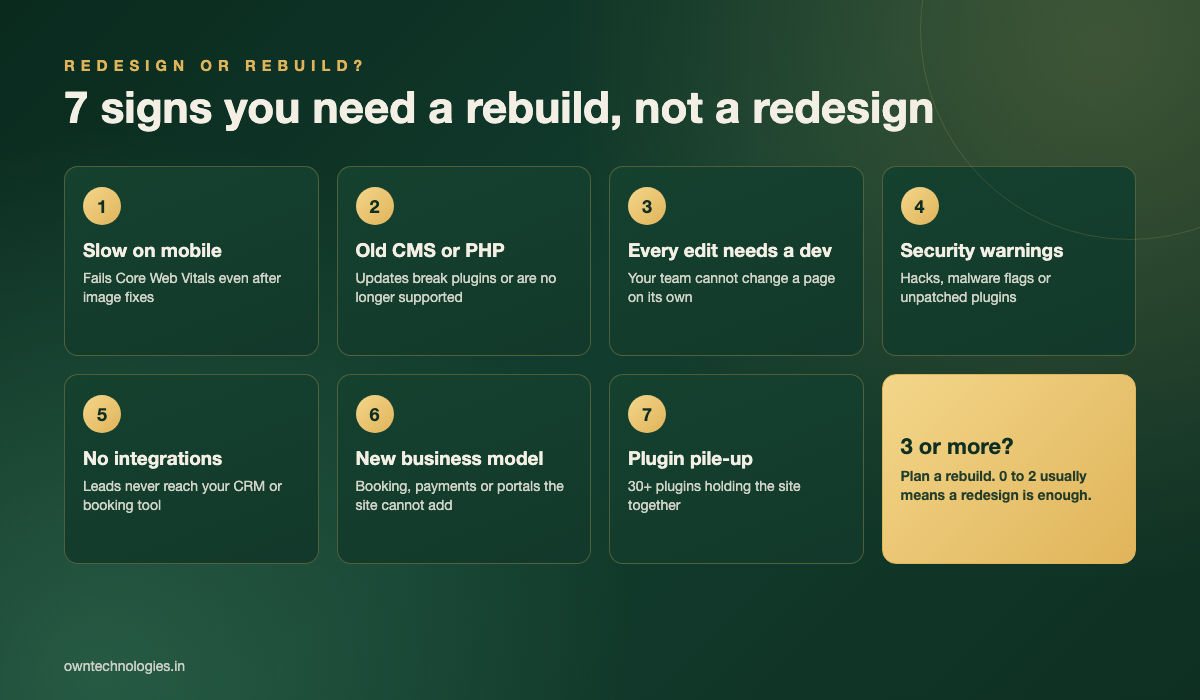
7 Signs You Need a Rebuild, Not a Redesign
Count how many of these apply to your current website. Be honest, because each one is a problem a redesign cannot fix on its own.
1. It is slow on mobile even after image fixes
If you have compressed images and added caching and the site still fails Google’s Core Web Vitals, the problem is usually the theme, the plugins, or the server. That is foundation work. Our guide on how website speed affects SEO and conversions explains why this matters for leads, not just rankings.
2. The CMS or PHP version is out of date
When updating WordPress, PHP, or a core plugin breaks the site, your team stops updating. Unpatched software is how most small business sites get hacked.
3. Every small edit needs a developer
Changing a price, adding a team member, or publishing an offer should take your team five minutes. If it needs a developer ticket, you are paying for a structural problem every week.
4. You have had security warnings or a hack
A site that has been infected once often carries hidden backdoors. Cleaning it helps, but moving your content to a clean build is the only way to be sure.
5. Leads do not reach your CRM or booking tool
If enquiries land in an inbox and someone copies them into a spreadsheet, you are losing leads to delay. Proper integrations are much easier to build on a clean platform.
6. Your business model has changed
You now take online bookings, sell products, run a member area, or serve three cities instead of one. A brochure site stretched to do all of that usually needs a new base.
7. The site depends on 30 or more plugins
Every plugin is another thing to update, another possible conflict, and more code for the browser to load. A long plugin list is often the root cause behind signs 1, 2, and 4.
When a Redesign Is Enough
Many business owners are sold a rebuild they do not need. A redesign is usually the right call when:
- The site loads in under three seconds on mobile and passes Core Web Vitals.
- Your team can edit pages without calling a developer.
- The CMS and plugins are up to date and have not caused problems in the last year.
- The real complaint is that the site looks dated, the message is unclear, or visitors do not enquire.
- You are not adding bookings, payments, or portals in the next 12 months.
In these cases the money is better spent on messaging, UX, and conversion design. Many of the common website mistakes that cost leads are design and content problems, not code problems.
Cost Ranges: Refresh vs Redesign vs Rebuild in 2026
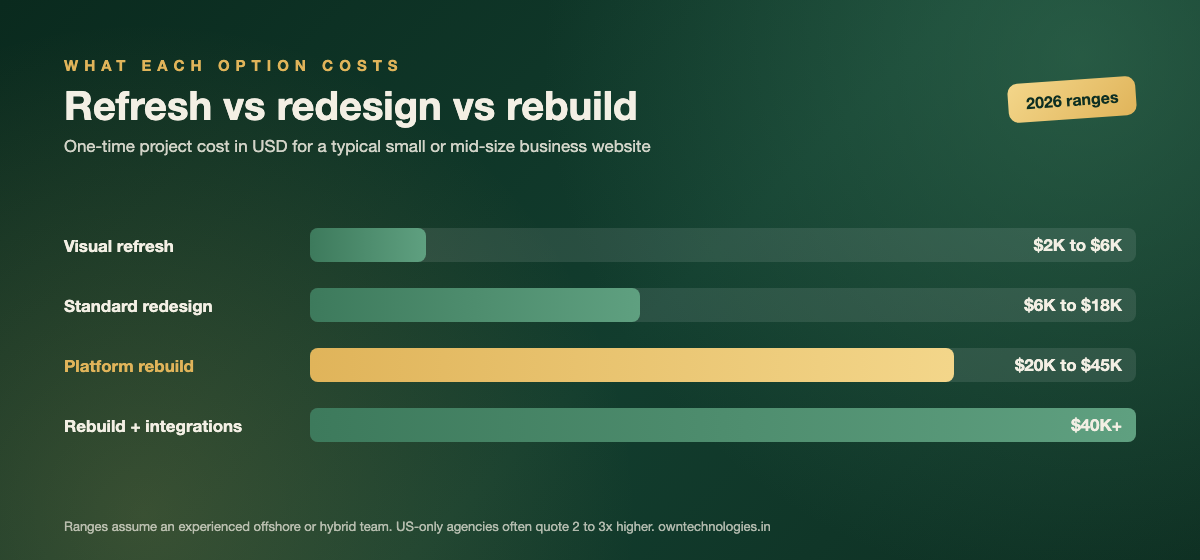
There are really four levels of work, not two. Knowing where your project sits keeps quotes comparable.
| Option | What is included | Cost (USD) | Timeline |
|---|---|---|---|
| Visual refresh | New theme styling, updated images and copy, same structure | $2,000 to $6,000 (around 1.6 to 5 lakh INR) | 2 to 3 weeks |
| Standard redesign | Custom design, UX overhaul, on-page SEO, 10 to 25 pages | $6,000 to $18,000 (around 5 to 15 lakh INR) | 4 to 8 weeks |
| Platform rebuild | New CMS or codebase, new design, content and SEO migration | $20,000 to $45,000 (around 16.5 to 37 lakh INR) | 8 to 14 weeks |
| Rebuild with integrations | Everything above plus CRM, booking, payments, or portals | $40,000+ (around 33 lakh INR and up) | 12 weeks+ |
These ranges assume an experienced offshore or hybrid team. For a detailed breakdown of each cost driver, read our full guide to website redesign cost in 2026, or see custom website development cost if you are leaning toward a full rebuild.
One point people miss: a cheap redesign on a broken foundation is not cheaper. If you spend $8,000 on a redesign and rebuild 18 months later anyway, the true cost is the rebuild plus $8,000.
The 10-Minute Decision Scorecard
Answer each question with yes or no. Every “yes” scores one point.
| Question | If yes |
|---|---|
| Does the site fail Core Web Vitals on mobile after basic image and caching fixes? | +1 |
| Is the CMS, PHP version, or theme more than two major versions behind? | +1 |
| Does your team need a developer for simple content edits? | +1 |
| Has the site been hacked or flagged for malware in the last two years? | +1 |
| Do leads need manual copying into your CRM or booking system? | +1 |
| Are you adding bookings, payments, a portal, or new locations within 12 months? | +1 |
| Does the site rely on more than 30 plugins? | +1 |
- 0 to 2 points: redesign. Your foundation is fine, so invest in design, content, and conversion.
- 3 to 4 points: rebuild is likely worth it. Ask for quotes on both and compare the three-year cost.
- 5 to 7 points: rebuild. A redesign would be money spent on a site you will replace soon.
The SEO Risk in a Rebuild (and How to Avoid It)
The biggest fear owners have about a rebuild is losing Google rankings. It is a fair fear. Rankings usually drop after a rebuild for three avoidable reasons: URLs change without redirects, content gets shortened or removed, and internal links break.
Google publishes clear guidance on moving a site with URL changes. In practice, a safe rebuild includes:
- A full crawl of the old site and a URL-by-URL 301 redirect map before launch.
- Keeping the pages that already rank, with their content improved rather than cut.
- Carrying over titles, meta descriptions, and structured data.
- Submitting the new sitemap and watching Search Console daily for two to four weeks.
With that plan, most sites hold their rankings and often gain within two to three months because the new build is faster. If search traffic matters to your business, involve an SEO team from the first week, not the last.
How to Run the Project Without Losing Leads
Whichever option you choose, the old site should keep working until the new one is ready. Here is the order that keeps enquiries flowing:
- Audit first: list your top pages by traffic and leads, so you know what must not break.
- Build on a staging site: never redesign or rebuild on the live website.
- Test every form and integration: submit a real enquiry and confirm it lands where it should.
- Launch midweek, not on a Friday: you want the team available if something needs fixing.
- Compare numbers after 30 days: traffic, enquiries, and conversion rate against the old site.
At OwnTechnologies, most business website projects are delivered in 3 to 6 weeks depending on scope, with larger rebuilds planned in phases so the old site keeps earning while the new one is built. Our website development team scopes redesigns and rebuilds side by side so you can see both numbers before deciding, and you can see past work in our portfolio.
Frequently Asked Questions
A redesign changes the design, layout, content, and user experience while keeping the same platform and code. A rebuild replaces the platform, code, and hosting underneath, and usually includes a new design as well.
A redesign is cheaper up front, typically $6,000 to $18,000 compared with $20,000 to $45,000 for a rebuild in 2026. But if the foundation is broken, a redesign often leads to a rebuild within two years, which makes it the more expensive path overall.
Not if it is planned properly. Map every old URL to a new one with 301 redirects, keep the content that already ranks, carry over titles and meta descriptions, and monitor Search Console for a few weeks after launch.
A platform rebuild for a typical business website takes 8 to 14 weeks. Rebuilds with CRM, booking, or payment integrations usually take 12 weeks or more. A standard redesign takes 4 to 8 weeks.
Most business websites benefit from a redesign every three to four years, with smaller refreshes in between. A rebuild is only needed when the platform itself becomes slow, insecure, or unable to support how the business works.
Final Thoughts
The redesign vs rebuild question is really a question about your foundation. If the platform is healthy, spend on design and conversion. If it is slow, fragile, or cannot support where your business is going, rebuild once and properly. Run the scorecard, count your points, and let that number guide the budget conversation.
Not sure where your site lands? Talk to OwnTechnologies for a free consultation. Send us your URL and we will tell you honestly whether a redesign or a rebuild makes sense, with a cost range for both, no commitment required.