Most founders ask “should we build an app?” when the real question is narrower: does this need to be installed from an app store, or does it just need to work brilliantly on a phone? Those are different problems with very different price tags.
A progressive web app is a website that behaves like an app. It installs to the home screen, works offline, and sends push notifications. For a large share of businesses it is the right answer. For some it is a mistake. This is how to tell which one you are.
What a PWA actually is
A PWA is a normal website with three additions: a service worker that caches files so it keeps working without a connection, a web app manifest that lets it install to the home screen with its own icon, and HTTPS. None of those are exotic. They are additions to a site you would be building anyway, which is why the cost gap is as wide as it is. Once installed it opens full screen with no browser bar, so most users cannot tell it apart from a downloaded app.
It is one codebase that serves desktop, Android and iPhone. That single fact drives most of the cost difference.
What a PWA can do in 2026
The capability gap has narrowed a lot, and most comparisons online are years out of date.
- Install to the home screen on Android and iOS, with a splash screen and its own icon
- Work offline or on a bad connection, including queueing actions to sync later
- Send push notifications, including on iOS for web apps added to the home screen, which Apple has supported since iOS 16.4 and documents for developers
- Use the camera, microphone, GPS and files
- Take payments, including through the browser’s own payment sheet
- Be found in Google, which an app in a store cannot be
That last one is the quiet advantage. Every page of a PWA is a URL that search engines can index and that you can link to from an ad, an email or a WhatsApp message. App store listings do not work like that.
What a PWA still cannot do well
Being honest about the limits is what makes the decision easy.
- **Deep hardware access.** Bluetooth Low Energy, NFC on iPhone, advanced camera control, background location tracking. If your product talks to a device, you are heading native.
- **Serious background work.** A PWA does very little while closed. Fitness tracking that counts steps all day, or an app that uploads large files in the background, needs native.
- **Heavy on-device processing.** Video editing, real-time AR, large models running locally.
- **App store presence as a channel.** Not a technical limit but a commercial one. If customers will search the App Store for you, or you need store billing for subscriptions, you need to be there.
- **iOS push is weaker.** It works, but only once the user installs the app to the home screen, and that extra step costs you a meaningful share of opt-ins.
The cost difference, honestly
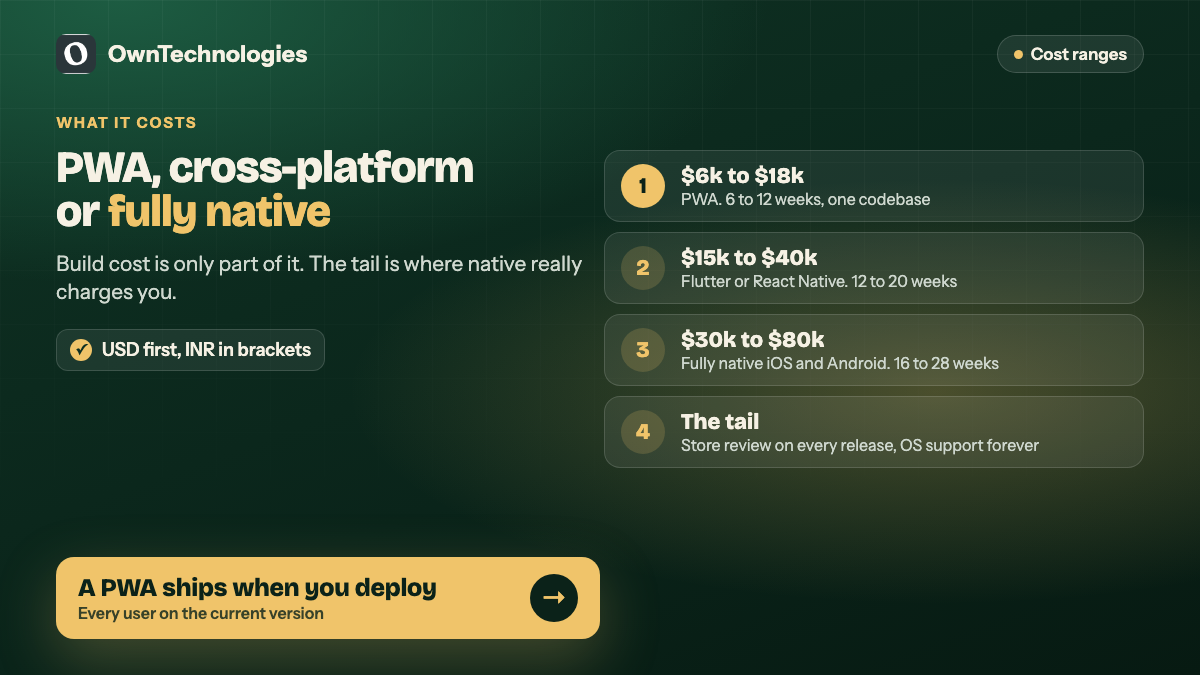
| Approach | Typical build cost | Timeline | Ongoing |
|---|---|---|---|
| PWA | $6,000 to $18,000 (5 to 15 lakh INR) | 6 to 12 weeks | Hosting, one codebase to maintain |
| Cross-platform native (Flutter or React Native) | $15,000 to $40,000 (12 to 33 lakh INR) | 12 to 20 weeks | Two store accounts, release cycles, OS updates |
| Fully native iOS and Android | $30,000 to $80,000 (25 to 65 lakh INR) | 16 to 28 weeks | Two codebases, two teams |
The build number is only part of it. A native app carries $99 a year for Apple and a one-off $25 for Google, store review on every release, and a permanent tail of OS version support. A PWA ships when you press deploy, and every user is on the current version immediately.
When a PWA is clearly the right call
Pick a PWA if most of these are true:
- Discovery happens through Google, ads or links, not through app store search.
- The core job is browsing, booking, ordering, reading or submitting something.
- You need it live in weeks, not quarters.
- You will iterate often and do not want to wait on store review.
- One budget has to cover desktop and mobile.
- Your users will not download an app for something they use occasionally.
Point six is the one most people underestimate, and it is worth sitting with before anyone writes code. A customer who books a salon appointment every six weeks will not install an app for it. They will use a link. Asking them to download something is asking them to do you a favour before you have earned it.
When you genuinely need native
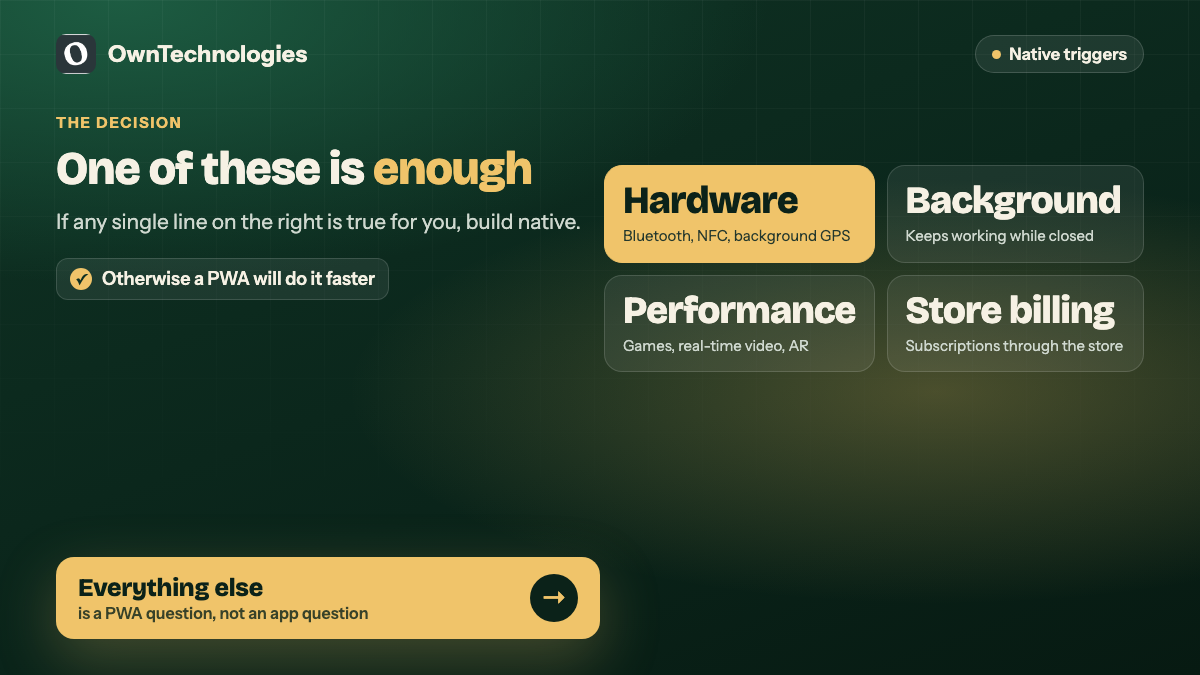
Go native if any one of these is true. One is enough.
- You need hardware the browser cannot reach: Bluetooth devices, NFC payments on iPhone, background GPS
- Your app must keep working while closed, tracking or syncing
- Performance is the product: games, real-time video, AR
- You need to sell subscriptions through store billing
- Your buyers expect to find you in the App Store, which is common in consumer fitness, finance and social
The approach we usually recommend
For most businesses the honest sequence is a PWA first, native later if the numbers justify it.
A PWA proves the thing people actually do. You learn which features get used, what the real demand looks like and where the drop-offs are, for a fraction of the cost, without store review slowing every fix. If the data then shows you need background processing or store distribution, you build native with a specification written from real behaviour instead of guesses.
The reverse order is expensive. Building native first means spending the larger budget to learn the same lessons, and most first versions are roughly twice the size they needed to be. This is the same argument we make about scope in our guide to what an MVP should cost: the cheapest version of a wrong assumption is always the one you find out about first.
One thing to decide early
If there is any chance you will go native later, say so at the start. It changes how the back end is built. An API designed to serve both a web front end and a future mobile client costs almost nothing extra on day one, and a surprising amount to retrofit.
Frequently Asked Questions
Yes. Apple added Web Push in iOS 16.4, but only for web apps the user has added to their home screen. On Android it works without that step. If push is central to your product on iOS, build in the home screen prompt deliberately rather than hoping people find it.
Yes, to the extent you design for it. A service worker caches the files and data you tell it to, and can queue actions to send when the connection returns. Offline is a feature you build, not something that happens automatically.
Yes, through a thin native wrapper. Google Play accepts them readily through Trusted Web Activity. Apple is stricter and rejects wrappers that are only a website, so you usually need some native functionality to pass review.
For ordinary business apps, no, and users cannot tell. The difference shows up in graphics-heavy work, real-time video and anything processing large amounts of data on the device.
Usually between a third and a half of a cross-platform native build for the same features, because there is one codebase, no store review cycle and no separate release process.
It helps in the sense that every screen is a real URL that can rank and be linked to, which an app cannot. The PWA itself is not a ranking factor, but the speed and mobile usability work that goes into one usually is.
Final Thoughts
The PWA versus native question is rarely about technology. It is about where your customers find you and what your product has to touch. If discovery is search and links, and the job is booking, buying or reading, a PWA will do it faster and cheaper. If you need the hardware or the store, pay for native and do it properly.
If you are weighing this decision now, send us what your product needs to do and we will tell you honestly which side it falls on, including when the answer is that you do not need an app at all. You can also look at our app development and website development work, or browse the portfolio.