Most maritime training institutes still run on a brochure website, a PDF course list, and a spreadsheet of enquiries. Trainees cannot see what runs next month, staff retype the same course details in three places, and serious candidates quietly book somewhere that looks more organised.
This guide shows what a modern maritime training institute website should include, using our work for BVT Training as a real case study. You will see the pages, the admin dashboard behind them, the build process, what it costs in 2026, and the mistakes to avoid.
Why a Maritime Training Website Needs More Than a Brochure
Maritime training is a high-trust, high-stakes purchase. A seafarer or a shipping company is choosing a course that affects certification, career progression, and sometimes the right to sail. That buyer behaves differently from someone booking a yoga class.
Here is what they usually want from your website, in order:
- Is the course right for me? Who it is for, entry requirements, duration, and what certificate it leads to.
- When does it run? Upcoming dates, seats, and location or online format.
- Can I trust this institute? Accreditation, instructors, facilities, and proof from past trainees.
- How do I start? A clear enquiry or enrolment path that does not end in an unanswered email.
A static site answers the first question badly and the second not at all. Course dates change every month, so if they live in a PDF or a hard-coded page, the website is wrong most of the time. That is the core reason training institutes need a website and an admin dashboard working together, not a website alone.
BVT Training at a Glance
BVT Training is a maritime vocational training brand. It offers professional maritime courses, events, and seminars focused on technical skills, leadership, and certified programmes. We delivered two connected products for them, which you can see on our BVT Training case study page.
| Product | Who uses it | Its job |
|---|---|---|
| Public website | Trainees, shipping companies, partners | Discover courses and events, build trust, capture enrolment interest |
| Admin dashboard | BVT staff | Manage courses, events, users, and day-to-day operations |
The two had to feel like one institution. Prospects see a professional training brand on the front end, and the team runs a structured back office behind it, from the same data.
The Three Problems We Had to Solve
Every training institute we speak to has some version of these three problems. BVT had all of them.
1. Trainees could not find the right programme fast
Learners needed to find maritime programmes and events quickly, on a site that still felt serious enough for certified training. A cluttered menu or a single long course page fails both tests.
2. Operations depended on scattered spreadsheets
Staff managing courses and users needed proper admin screens, so that publishing a new course date or checking a user did not mean hunting through files. We wrote more about this pattern in why businesses are replacing spreadsheets with custom admin panels.
3. One brand, two very different jobs
The public site sells and the admin dashboard operates. They have different users and different priorities, but both had to carry the same institutional trust and visual tone.
Pages Every Maritime Training Institute Website Needs
The BVT site is built around a short, clear navigation: Home, About, Courses, Events, and Contact, with Login or Register and an Enroll Now button always visible. That structure works for almost any maritime academy or training centre. Here is what each page should do.
| Page | Must include | Common mistake |
|---|---|---|
| Home | One clear promise, featured courses, upcoming events, primary Enroll button | A slider of ship photos with no course in sight |
| Courses | Searchable catalogue, filters by category, one page per course | A single PDF download |
| Course detail | Who it is for, entry requirements, duration, certificate, dates, fee, enquire button | Missing dates, so trainees phone to ask |
| Events | Workshops and seminars with date, format, and registration | Past events still listed as upcoming |
| About and Instructors | Accreditation, mission, instructor profiles, facilities | Generic stock text that could fit any institute |
| Contact | Form, email, phone, location, response time | A form that goes to an unmonitored inbox |
| Login / Register | Account for trainees to track enquiries and enrolments | Asking for an account before showing any course |
If you are planning a broader education product such as an app or a learning platform, our guide on education app development features and cost covers the LMS side in detail.
Make Courses the Centre of the Site
On the BVT home page, the hero sends visitors straight to Explore Courses, followed by Training Courses, Featured Courses, and Upcoming Events sections. The site is course-centric by design, because courses are what trainees came for.
The important detail is that courses and events are not typed into the page. They load from the admin dashboard. When staff add or edit a course, the website updates. Nobody waits for a developer, and nobody forgets to update a second copy.
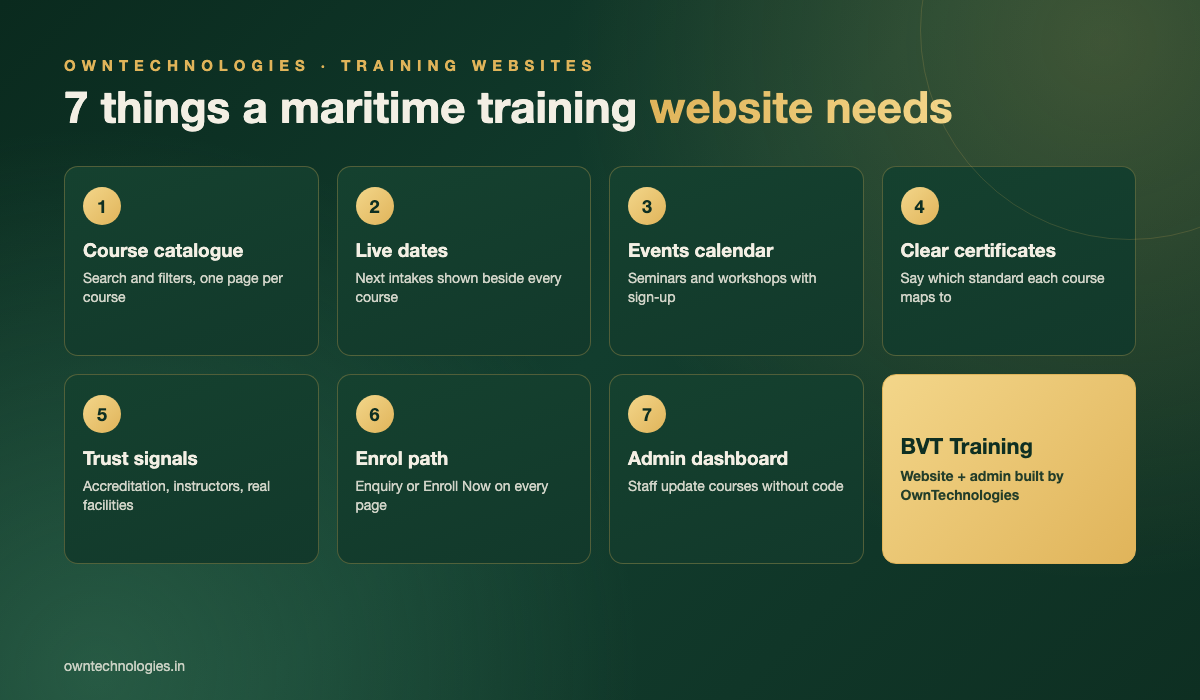
What a good course page contains
- Course title written the way trainees search for it, not only the internal code
- Who should attend and the entry requirements
- Duration, format, and location
- The certificate or competence it leads to, and the standard it maps to
- Next available dates and an enquire or enrol button next to them
- Instructor names, so the course feels run by real people
Many maritime courses map to international standards such as the IMO STCW Convention. Saying clearly which requirement a course supports, where that is accurate, answers the trainee’s biggest question before they have to ask it.
Events, seminars, and intakes
Events give a training website a reason to be revisited. BVT lists workshops and seminars in their own section, with a full calendar one click away. Marking events up with Google’s event structured data also helps them show up with dates in search results.
The Admin Dashboard: Running Training Without Spreadsheets
The admin dashboard is the half of the project visitors never see, and the half staff use every day. For BVT we built operational screens with filters, search, and readable tables for courses and users, so routine work feels routine.
A training institute admin panel usually needs these modules:
- Courses: create, edit, publish, feature, and archive courses with all their details
- Events: add seminars and workshops with dates and capacity
- Users: trainee and staff accounts with roles and permissions
- Enquiries and enrolments: one list with status, so no lead sits forgotten
- Content: instructors, partners, and testimonials, editable without code
Once enquiry volume grows, many institutes add follow-up reminders, counsellor assignment, and reports. At that point the admin panel starts to become a CRM, which is exactly the kind of system our CRM development team builds for training and education businesses.
Trust Signals for Certified Training
Trainees and employers are cautious with certified training, so the website must earn trust quickly. On the BVT site, the brand story, partner recognition, and the Instructors page do this work alongside the course catalogue.
- Accreditations and approvals, stated precisely and only where true
- Instructor profiles with real experience at sea or in industry
- Photos of actual facilities and simulators, not stock images
- Trainee testimonials with name, rank, and course taken
- A visible physical address and a phone number that is answered
How We Built It: Our Process
We followed the same five steps we use for most website and admin builds. The order matters: the data model comes before the design, because the website and the dashboard both read from it.
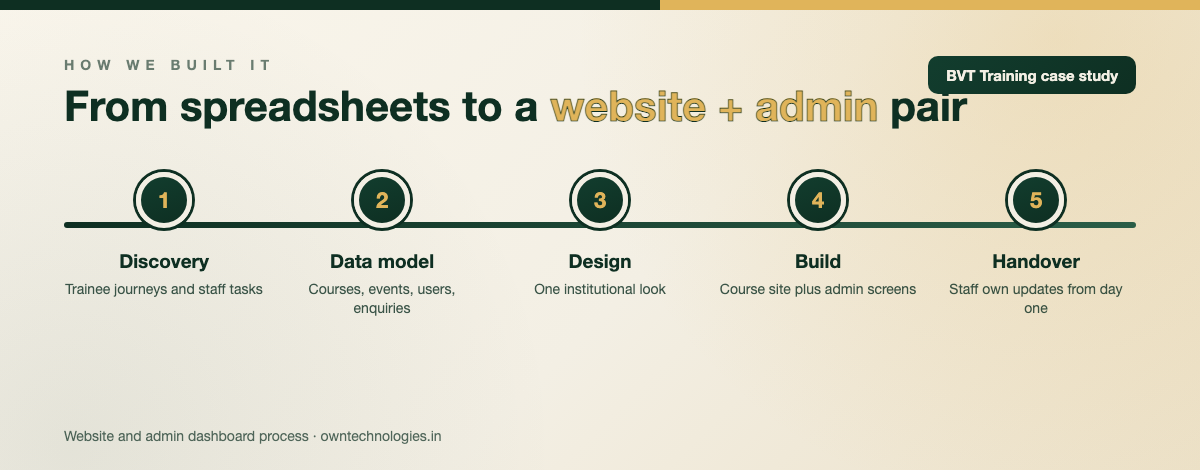
- Discovery: map trainee journeys and the staff tasks currently done in spreadsheets.
- Data model: define courses, events, users, and enquiries once, shared by both products.
- Design: one institutional visual system for the public site and the admin screens.
- Build: course-centric website plus admin dashboard with filters, search, and tables.
- Launch and handover: staff training on the dashboard so the team owns updates from day one.
The result: BVT now has a website and admin pair that supports maritime trainee acquisition and smoother training operations. Prospects explore programmes publicly while the team runs the back office with structure.
What a Maritime Training Website Costs in 2026
Costs depend mainly on how much runs through the admin dashboard and whether trainees pay or learn online. These are typical 2026 ranges for a professionally built site from an experienced team.
| Scope | What you get | Typical cost | Timeline |
|---|---|---|---|
| Brochure website | 5 to 8 pages, course list, contact form | $3,000 to $7,000 (around 2.5 to 6 lakh INR) | 3 to 6 weeks |
| Website + admin dashboard | Course catalogue and events from an admin panel, user accounts, enquiries | $8,000 to $18,000 (around 6.5 to 15 lakh INR) | 8 to 12 weeks |
| Full training platform | Online payments, trainee portal, certificates, LMS or exam module | $18,000 to $40,000 (around 15 to 33 lakh INR) | 12 to 20 weeks |
For a wider breakdown of what drives website pricing, see our guide to custom website development cost in 2026. Budget around 15 to 20 percent of the build cost per year for hosting, updates, and small improvements.
Mistakes Training Institutes Make With Their Websites
- Course dates in a PDF. It is out of date the week after you upload it.
- No course detail pages. One long page cannot rank for each course name trainees search.
- Forms with no owner. Every enquiry needs a status and a person responsible.
- Building the website and admin separately. Two vendors or two databases means double entry forever.
- Ignoring mobile. Many seafarers browse from a phone between contracts or on shore leave.
- No search plan. Course pages need titles and descriptions that match how people search. Our SEO services start with exactly that.
Google also supports course info structured data for some course listings, which is worth discussing with your developer when you plan course pages.
Frequently Asked Questions
It should include a searchable course catalogue with one page per course, upcoming dates, an events calendar, accreditation and instructor details, a clear enquiry or enrolment path, trainee login, and an admin dashboard so staff can update courses without a developer.
A brochure website costs around $3,000 to $7,000 (2.5 to 6 lakh INR). A website with an admin dashboard for courses, events, and enquiries costs $8,000 to $18,000 (6.5 to 15 lakh INR). A full platform with payments and an LMS costs $18,000 to $40,000 (15 to 33 lakh INR).
Course dates, seats, and events change constantly. An admin dashboard lets staff publish and edit them in one place, and the website updates automatically. It also keeps enquiries and users in one system instead of scattered spreadsheets.
A brochure website takes 3 to 6 weeks. A website with an admin dashboard usually takes 8 to 12 weeks, and a full training platform with payments and online learning takes 12 to 20 weeks.
We built a public website for discovering maritime courses, events, and enrolment interest, plus an admin dashboard for managing courses, users, and operations, designed so both feel like one trusted training brand.
Final Thoughts
A maritime training institute website works when courses sit at the centre, dates are always current, trust is visible, and staff run everything from one admin dashboard. BVT Training shows how a public website and a back office can feel like one institution instead of two disconnected tools. You can browse more projects like it in our portfolio.
Planning a new website for your training institute or academy? Our website development team can scope it with you. Book a free consultation with OwnTechnologies and we will map your courses, pages, and admin needs into a clear estimate.