Your sales lead tracker is a spreadsheet. Your inventory count is a spreadsheet. Your client onboarding checklist lives in another spreadsheet that only one person knows how to update. It worked when you had five employees. It is quietly costing you money now that you have fifty.
This guide explains why business owners are moving from spreadsheets to custom admin panels in 2026, what a custom panel actually replaces, what it costs, and how to know you have outgrown the spreadsheet stage.
The Real Cost of Running Your Business on Spreadsheets
A spreadsheet costs nothing to open and everything to maintain once your team grows past a handful of people. There is no login history, no permission levels, and no way to know who changed a number at 4pm on a Friday. Microsoft’s own documentation shows a single worksheet tops out at 1,048,576 rows, and Google Sheets caps a file at 10 million cells, limits that sound generous until formulas, lookups, and years of history slow the file to a crawl long before you hit them.
A custom admin panel (sometimes called an internal tool, a back office, or a lightweight ERP) replaces that spreadsheet with a real web application: logins, roles, a database instead of cells, and dashboards that update themselves. It is not a bigger spreadsheet. It is software built around how your business actually runs.
Why Spreadsheets Break Down as You Grow
None of these problems show up on day one. They show up around the time your team crosses 10 to 15 people, or you add a second location, or a client asks for a report you cannot produce without an hour of manual copy-pasting.
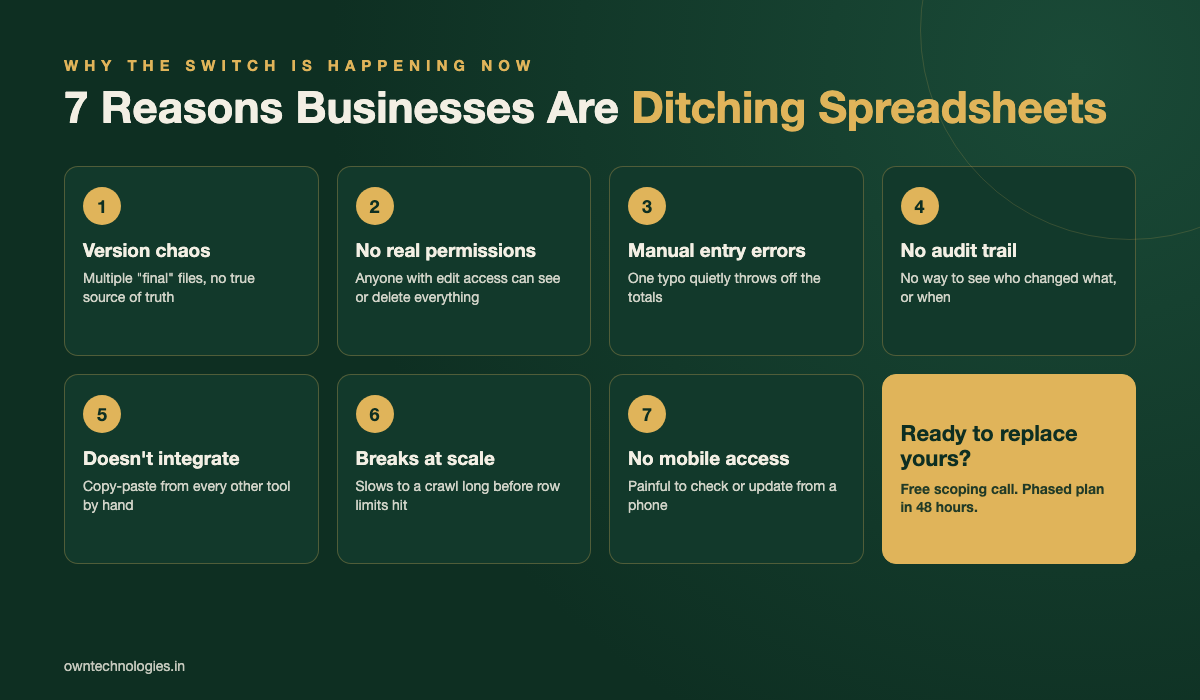
1. Version chaos
“Inventory_final_v3_ACTUAL.xlsx” is a running joke in every growing company. Once a file is emailed, shared, or duplicated, you no longer have one source of truth, you have several, and nobody is sure which one is current.
2. No real permissions
A shared spreadsheet is all-or-nothing. Give a new hire edit access and they can see every client’s pricing, every employee’s salary, or delete a formula by accident. Locking cells helps a little and breaks the first time someone needs to add a column.
3. Manual entry errors
Every number typed by hand is a chance for a typo that quietly throws off a total. There is no validation stopping someone from entering a date in a price column, and no alert when a formula gets dragged over the wrong range.
4. No audit trail
If a number is wrong, you cannot see who changed it, when, or from what. For anything involving money, compliance, or client data, that gap becomes a real business risk, not just an inconvenience.
5. It does not talk to your other tools
Your spreadsheet does not know what happened in your payment gateway, your WhatsApp Business account, or your website’s contact form. Someone has to copy that data over by hand, usually late and usually with mistakes.
Spreadsheet vs Custom Admin Panel: A Direct Comparison
| What you need | Spreadsheet | Custom admin panel |
|---|---|---|
| User roles and permissions | Manual, easy to break | Built in, enforced by the system |
| Audit trail (who changed what) | None | Full history by default |
| Real-time dashboards | Manual refresh, formulas break | Live, calculated on the database |
| Integrations (payments, WhatsApp, website) | Copy-paste by hand | Automatic via API |
| Multiple people editing at once | Conflicts and overwritten data | Designed for concurrent use |
| Mobile access | Painful on a phone | Responsive by design |
| Cost at 5 users | Free | $0, not yet worth it |
| Cost at 30+ users | Hidden cost: hours lost weekly | One build, then low upkeep |
The honest takeaway from that table: spreadsheets are the right tool at a small scale. The switch to a custom admin panel earns its cost back once manual work, errors, and access risk start outweighing what the software costs to build.
Signs It Is Time to Replace the Spreadsheet
- More than one person edits the same file and you have had a “someone overwrote my changes” moment
- You have ever emailed a spreadsheet as an attachment because sharing a live link felt too risky
- A single employee is the only one who understands how the formulas work
- You spend more than 3 to 4 hours a week copying data between tools by hand
- You cannot answer “how many of X did we have last Tuesday” without opening old file versions
- You are paying for three SaaS subscriptions that each do one-third of what you actually need
If two or more of these sound familiar, the spreadsheet is no longer saving you money, it is quietly costing you time every single week.
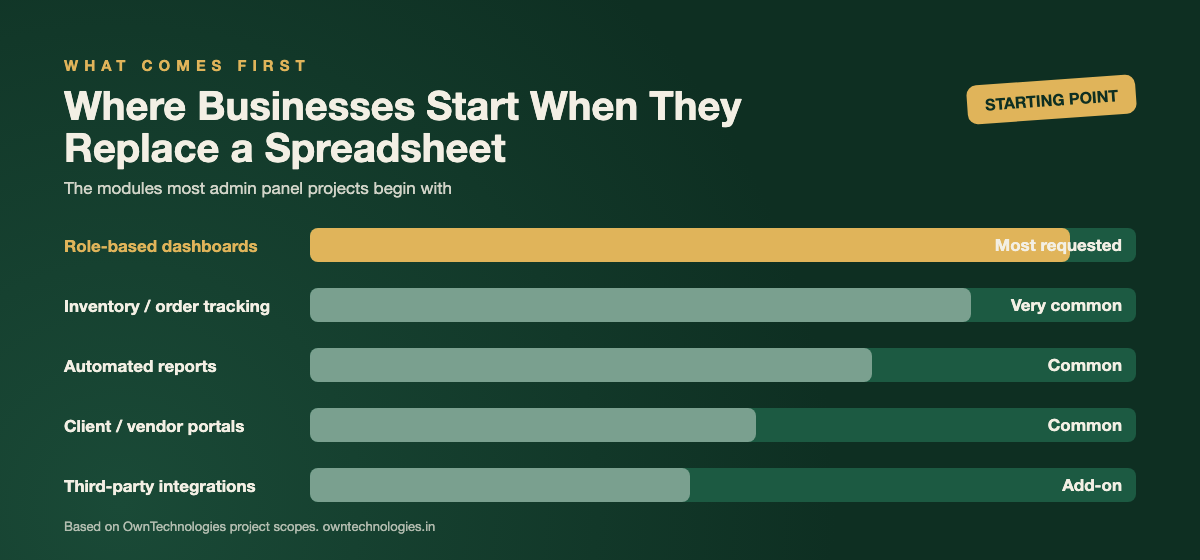
What Businesses Are Actually Building Instead
Most admin panel projects are not a full ERP rebuild. They start narrow, replacing the one or two spreadsheets causing the most pain, then grow module by module.
- Role-based dashboards: owners see everything, managers see their team, staff see only their own tasks
- Inventory or order tracking: live stock counts instead of a count that is only accurate right after someone updates it
- Automated reports: weekly or monthly numbers emailed automatically instead of built by hand every time
- Client or vendor portals: outside users see a limited, safe view without touching your internal data
- Integrations: payment gateways, WhatsApp Business API, accounting software, and your website’s lead forms feeding one system
This is the same shift we cover in our guide on building your own ERP instead of buying one: most businesses do not need every module of a big platform, they need the three or four that solve their actual bottleneck.
Custom Admin Panel Cost and Timeline in 2026
| Scope | What it covers | 2026 cost (USD) | Timeline |
|---|---|---|---|
| Single-module panel | One spreadsheet replaced: inventory, orders, or leads, with 1 to 2 user roles | $4,000 to $9,000 | 3 to 5 weeks |
| Multi-module admin panel | 3 to 5 modules, role-based access, reporting dashboard | $9,000 to $25,000 | 6 to 10 weeks |
| Admin panel with integrations | Everything above plus payments, WhatsApp, or accounting software sync | $20,000 to $45,000 | 10 to 16 weeks |
| Full internal platform | Multi-branch, mobile app, advanced analytics, custom workflows | $45,000+ | 4 months+ |
In INR, that is roughly 3.3 lakh to 7.5 lakh for a single-module panel, up to 37 lakh or more for a full internal platform. Most businesses start with the single-module or multi-module tier and expand once the team sees the time it saves. Our custom CRM development cost guide breaks down the same math for the sales side specifically.
Custom Admin Panel vs Off-the-Shelf Tools
Tools like Airtable, Notion, and Monday.com are a real middle step between a spreadsheet and custom software, and they are worth trying first if your workflow is simple. They fall short once you need strict role permissions, deep integrations with your own systems, or a workflow specific enough that you are fighting the tool’s templates instead of using them. At that point the monthly per-user fees on these platforms also start approaching what a modest custom build costs outright.
A useful rule: if you can describe your process in one sentence, an off-the-shelf tool probably handles it. If explaining your process takes a paragraph with three exceptions, you are likely already paying for workarounds that a custom panel would remove.
How to Plan Your Admin Panel Project
- Pick the one spreadsheet causing the most pain. Do not try to replace everything at once. Start with the file people complain about most.
- Write down who needs to see what. List every role (owner, manager, staff, client) and exactly what each one should and should not see.
- List the tools it needs to talk to. Payment gateway, WhatsApp, accounting software, your website. Each one is a scoped integration, not a guess.
- Decide what “done” looks like for phase one. A working panel your team actually uses beats a perfect one still in development six months later.
- Choose a team that has built admin panels before. Reusable login, permission, and dashboard components cut both cost and timeline significantly.
What a Real Migration Looks Like
A typical OwnTechnologies admin panel project starts with a short discovery call to see the actual spreadsheet in use, followed by a clickable prototype so your team can react before any code is written. Development runs in two-week sprints, and your old spreadsheet stays in use as a backup until the team has fully switched over, so there is no risky single cutover day. Clients including Solaris and IGNTI moved core operations off spreadsheets this way in 6 to 10 weeks. See more in our portfolio.
If the panel needs to connect to a customer-facing website or booking page, our website development team scopes both together so they share one database instead of two systems quietly drifting apart.
Frequently Asked Questions
Once more than one person edits the same file regularly, you spend over 3 to 4 hours a week on manual data entry, or a single employee is the only one who understands the formulas, a custom admin panel usually pays for itself within the first year.
A single-module panel replacing one spreadsheet costs $4,000 to $9,000. A multi-module panel with reporting runs $9,000 to $25,000, and a panel with integrations to payments or WhatsApp costs $20,000 to $45,000, depending on scope.
For simple workflows, yes. Once you need strict role-based permissions, deep integrations with your own systems, or a process too specific for their templates, the monthly per-user fees on these tools start to approach the cost of a custom build with none of the flexibility.
A single-module panel takes 3 to 5 weeks. A multi-module panel with dashboards takes 6 to 10 weeks. Adding integrations extends that to 10 to 16 weeks depending on how many third-party systems are involved.
Yes, and it is recommended. A safe migration keeps the spreadsheet as a backup until the team has fully adopted the new panel, avoiding a single risky cutover day where data could be lost.
You should own the full source code, database, and repository once final payment is made. Confirm this in the contract before the project starts, since some vendors retain ownership and charge to release it.
Final Thoughts
Spreadsheets are not the enemy, they are simply the wrong tool once your business outgrows them. The businesses making the switch in 2026 are not replacing everything at once, they are picking the one spreadsheet causing the most pain and building real software around it first. Everything after that gets easier to run, easier to report on, and easier to hand off to a new hire.
Still not sure if you have outgrown the spreadsheet stage? Talk to OwnTechnologies for a free scoping call. Show us the spreadsheet that is causing the most headaches and we will send back a phased plan within 48 hours, no commitment required.