Robotics companies build some of the most impressive products in any industry, then explain them on websites that read like spec sheets. Buyers in hospitals, warehouses, and factories do not want torque ratings first. They want to know what problem goes away, how safe it is, and who else trusts it.
This guide shows how to plan a robotics company website that sells to non-engineers, using our work for Solaris Robots as a real example. You will see the structure, the pages, the four digital surfaces a robotics brand usually needs, what it costs in 2026, and the mistakes to avoid.
Why Robotics Websites Are Hard to Get Right
A robotics website has to speak to several audiences at once, and they all want different things.
- The economic buyer (a hospital administrator, operations head, or plant manager) wants outcomes, cost justification, and risk reduction.
- The technical evaluator wants specifications, safety standards, integration details, and support terms.
- The end user (nurses, cleaning staff, operators) wants to know the robot is easy to use and will not add to their workload.
- Existing customers need a place to log in, check status, and run their day-to-day work.
Most robotics sites serve only the technical evaluator. The result is a beautiful product page that the person who signs the purchase order never reads to the end.
Case Study: How Solaris Robots Presents Its Products
Solaris Robots builds purpose-driven robotics for care environments. Its two best-known products are Lytbot, a pulsed UV disinfection robot for hospital-grade environmental infection prevention, and Feedbick, a system for feedback capture and service tracking.
The challenge, as documented in our Solaris Robots case study, had three parts:
- Explain hospital-grade UV disinfection and service robotics in terms of business value, safety and outcomes first, not engineering jargon.
- Give operators a secure portal for day-to-day robotics workflows, separate from the marketing site.
- Show the robots working in real environments through demo and brand film, tied to the same care story.
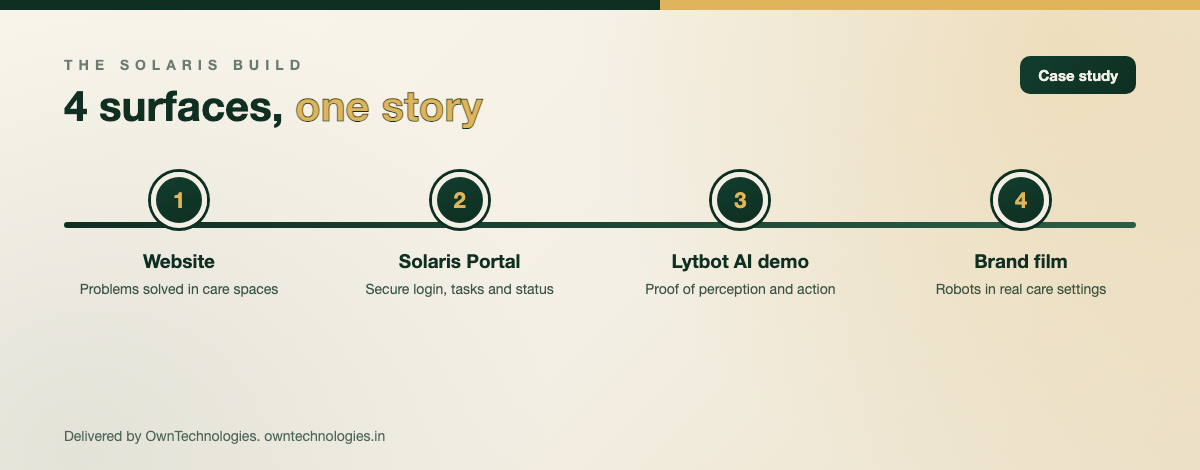
Our answer was four connected deliverables rather than one website. Together they let Solaris present a unified robotics brand: marketing that explains care-focused automation, a portal for operations, and demo and video proof that backs the claim.
The 4 Digital Surfaces a Robotics Brand Needs
The Solaris build is a useful template for almost any robotics or hardware company. Each surface has one job.
| Surface | Its one job | Who uses it | Solaris example |
|---|---|---|---|
| Marketing website | Explain the problem solved and move serious buyers to contact | Buyers, evaluators, press | Structured around infection prevention, insight, and performance in care spaces |
| Client portal or admin panel | Let customers and operators log in and run daily workflows | Operators, customer admins | Solaris Portal with secure login and task and status views |
| Product demo | Prove the technology works, especially AI perception and action | Sales team, evaluators | Lytbot AI demo |
| Brand and product video | Show the robot in a real environment in under two minutes | Everyone, especially on social and in sales decks | Brand film showing Solaris robotics in care contexts |
Keeping the portal off the marketing site matters more than it sounds. When customers log in through the same menus that prospects browse, both experiences get worse, and security reviews get harder.
Structure the Website Around Problems, Not Parts
The biggest decision on the Solaris website was to organise it around problems solved in care spaces rather than around hardware features. That principle works for any robotics company.
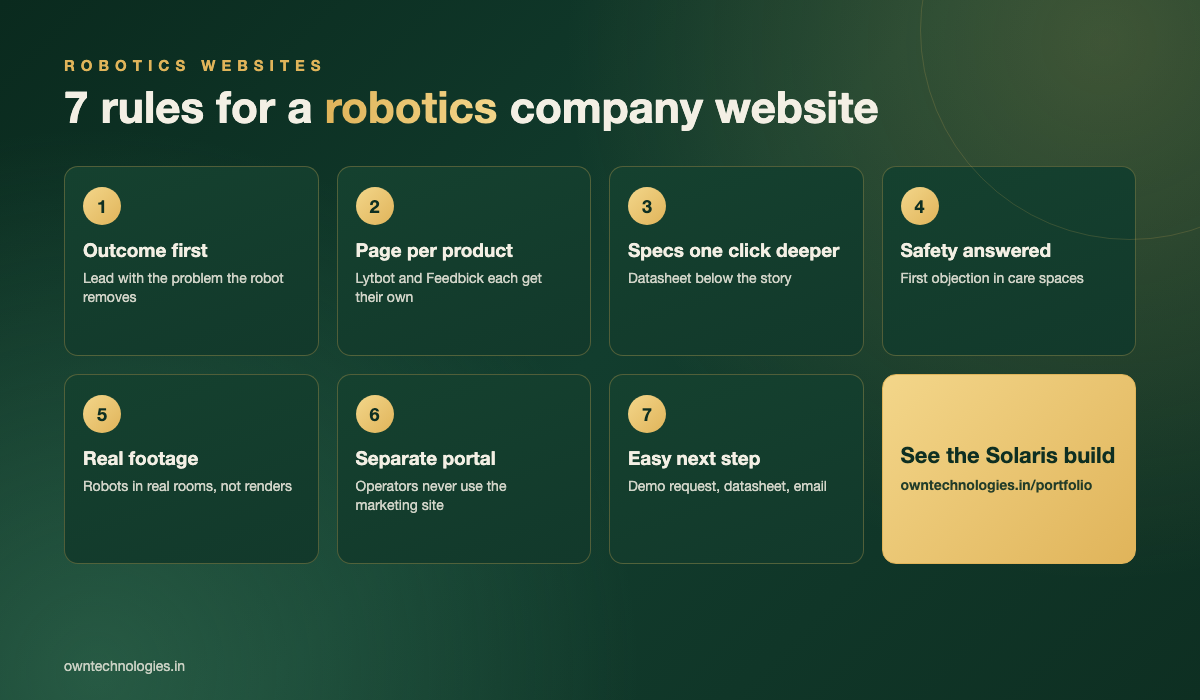
Lead with the outcome
The Solaris home page opens with robotics “built for the frontline of care”, then moves straight to what each product does for a space. A warehouse robotics brand would lead with picking accuracy or labour hours; an agricultural one with yield or input cost.
Give every product its own page
Lytbot and Feedbick each have a dedicated page and a clear “Discover” path from the home page. One page per product lets you rank for each product’s search terms and send sales prospects a focused link.
Keep specs one click deeper
Technical evaluators will look for specifications, so make them easy to find, but place them below the outcome story or in a downloadable datasheet so the first scroll speaks to the buyer.
Pages Every Robotics Company Website Needs
- Home: the core promise, one line per product, proof, and a clear contact path
- One page per product: problem, how it works in plain language, where it is used, safety, and a demo request
- Use cases or industries: hospitals, labs, hotels, warehouses, whichever you actually serve
- Proof: testimonials, deployments you are allowed to name, certifications
- Video and demo: a short film and, if you have AI features, an interactive or recorded demo
- Support and client login: a visible link to the portal for existing customers
- Contact or book a demo: a short form that asks about site size and use case, not twenty fields
If you are weighing a fresh build against improving your current site, our guide on website redesign vs rebuild walks through the decision.
Show the Robot Working: Video and Demos
Robots are physical and they move. Still photos undersell them. For Solaris we delivered brand and demo video that shows the robotics in care contexts, focusing on capability, motion, and purpose rather than abstract tech spectacle.
- Keep the main film between 60 and 120 seconds and show a real environment in the first five seconds
- Add captions, since most social and in-office viewing is muted
- Cut 15 to 30 second clips for LinkedIn and sales emails from the same footage
- Host video so it does not slow the page; lazy-load anything below the first screen
Speed still matters on video-heavy pages. Google’s Core Web Vitals guidance is a good checklist for keeping a media-rich site fast.
The Client Portal: Where Customers Actually Work
Once a robot is deployed, the website becomes less important than the portal. Solaris Portal uses secure authentication and task and status focused screens so operators can work without using the marketing site as a console.
A typical robotics client portal includes device or fleet status, task scheduling, usage and service history, reports customers can download for their own audits, user roles for supervisors and operators, and a support ticket flow. We cover the build side of these systems in our CRM and admin panel development service, and why teams move off spreadsheets in this guide to custom admin panels.
What a Robotics Company Website Costs in 2026
These are our planning ranges for a robotics or hardware company working with an experienced development team.
| Scope | What is included | Typical cost | Timeline |
|---|---|---|---|
| Marketing website | 8 to 15 pages, product pages, use cases, demo request, SEO setup | $4,000 to $12,000 (around 3.3 to 10 lakh INR) | 4 to 8 weeks |
| Website + client portal | Everything above plus secure login, device status, tasks, reports, roles | $12,000 to $35,000 (around 10 to 29 lakh INR) | 10 to 16 weeks |
| Brand film and demo video | Script, edit, motion graphics, social cut-downs | $1,500 to $6,000 (around 1.2 to 5 lakh INR) | 2 to 4 weeks |
| Interactive AI demo | Recorded or live demo of perception or analytics features | $3,000 to $10,000 (around 2.5 to 8.3 lakh INR) | 3 to 6 weeks |
For how website pricing breaks down in general, see our custom website development cost guide.
Common Mistakes on Robotics Websites
- Specs above the fold: the buyer leaves before reaching the part that matters to them.
- Renders instead of real footage: buyers want to see the robot in a real room, not only in a studio render.
- No safety story: in hospitals, schools, and public spaces, safety is the first objection. Answer it on the product page.
- Portal mixed into the marketing site: customers get lost and prospects see login screens.
- Contact form as the only next step: offer a demo request, a datasheet download, and a direct email.
- Writing for search engines instead of people: Google’s own guidance on creating helpful content rewards clear, useful pages written for the reader.
How OwnTechnologies Builds for Technology Brands
We have delivered 100+ projects over 8+ years for clients in 15+ countries. For Solaris Robots that meant a website, the Solaris Portal admin panel, AI demo assets, and video, all telling one story. Our website development team handles the marketing site, and the same team can build the portal and video so nothing feels bolted on. You can browse the full project, with screens, in our portfolio.
Frequently Asked Questions
A robotics company website should include a home page built around the problem you solve, one page per product, use case or industry pages, proof such as testimonials and certifications, video of the robot in a real environment, a client login link, and a simple demo request form.
A robotics marketing website typically costs $4,000 to $12,000 in 2026. Adding a secure client portal for device status, tasks, and reports raises the range to $12,000 to $35,000. Brand and demo video usually adds $1,500 to $6,000.
It is better to keep them separate. A dedicated portal with its own secure login keeps operator workflows clean and safe, while the marketing site stays focused on explaining the product to buyers. A visible Client Login link connects the two.
OwnTechnologies delivered four connected pieces for Solaris Robots: the marketing website, the Solaris Portal admin panel for operators, Lytbot AI demo assets, and brand video showing the robotics in care environments.
A marketing website usually takes 4 to 8 weeks. A website with a client portal takes 10 to 16 weeks, and video production runs in parallel over 2 to 4 weeks.
Final Thoughts
A robotics company website works when it sells the outcome to the buyer, gives evaluators the detail they need one click deeper, proves the robot works on video, and hands customers a separate portal for daily work. Solaris Robots shows how those four surfaces can tell one consistent story instead of four disconnected ones.
Building or rethinking the website for a robotics or hardware product? Book a free consultation with OwnTechnologies and we will map your audiences, pages, and portal needs into a clear scope and estimate.