Most real estate websites look fine and still produce almost no enquiries. Listings go up, ads send traffic, and the phone stays quiet while buyers message the portal next door.
This guide covers the real estate website features that actually turn visitors into calls, WhatsApp chats, and site visit bookings in 2026. You will also see which features to skip, how to connect the site to your CRM, and what a build like this costs.
Why Real Estate Websites Get Visits but Not Enquiries
A buyer who lands on your site is usually comparing you with two or three portals and a few other agencies. They leave within seconds if they cannot find a matching property, cannot see the price, or cannot reach a person without filling a long form.
Research from the National Association of Realtors has shown for years that buyers start their search online, long before they speak to an agent. So your website is not a brochure. It is the first agent a buyer meets, and it needs to answer questions and hand off leads the way a good agent would.
The usual reasons a property site underperforms:
- Search is weak: only a city dropdown, no budget, bedroom, or possession filters.
- Listings are thin: three stock photos, no floor plan, no price or “price on request” everywhere.
- Contact is hidden: one form at the bottom of the page and no WhatsApp or call button.
- Leads go nowhere: form entries land in a shared inbox and nobody replies for a day.
- It is slow on mobile: heavy image galleries that take several seconds to load on 4G.
Property Search That Buyers Actually Use
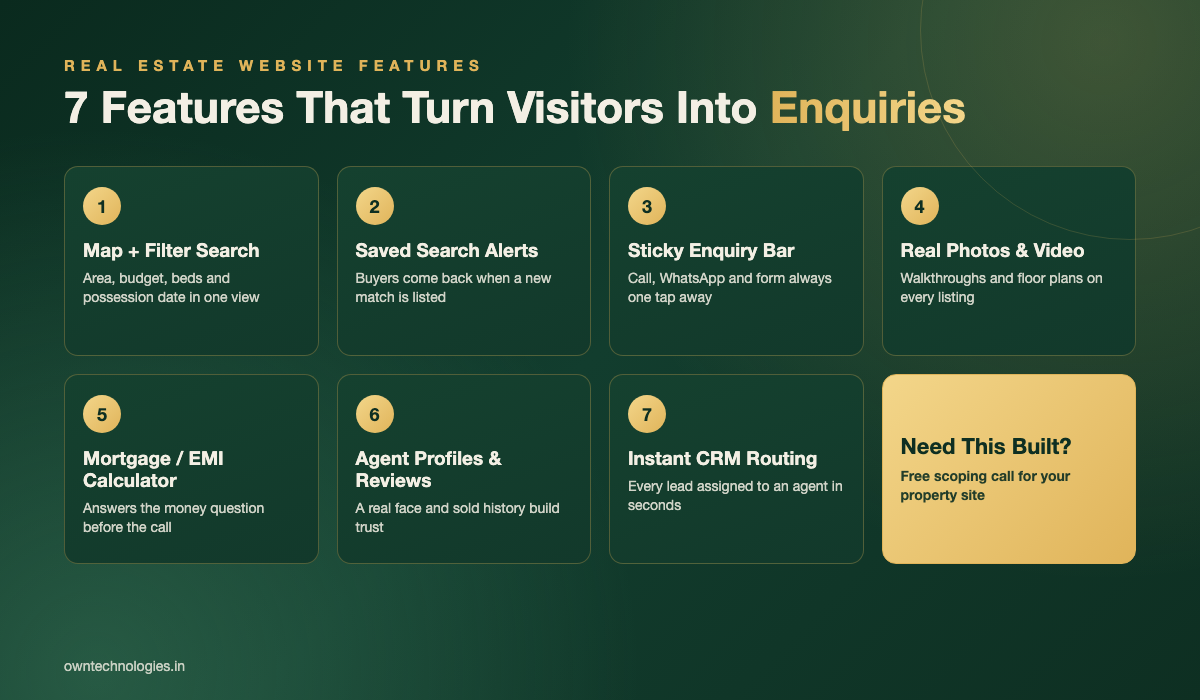
Search is the single most used feature on any real estate website. If buyers cannot narrow 400 listings down to the 6 that fit them in under a minute, they go back to the portal.
Filters that match how buyers think
Location, budget range, property type, bedrooms, and status (ready to move or under construction) are the minimum. For rentals add furnishing and move-in date. For new projects add possession year and developer. Keep the filters visible on mobile instead of hiding them three taps deep.
Map search
Buyers think in neighbourhoods, commute times, and school zones, not in listing IDs. A map view with pins that update as the buyer drags or zooms keeps them on your site far longer than a plain list. Show nearby schools, metro stations, and hospitals as optional layers.
Saved searches and new listing alerts
This is the feature most agency sites skip and the one that brings buyers back. Let visitors save a search with just an email or phone number, then send them an alert when a new match is listed. Every alert is a reason to return to your site instead of a competitor’s.
Listing Pages Built to Convert
The listing page is where the enquiry happens. Treat it like a sales page, not a data sheet.
Real photos, video, and floor plans
Use 15 to 30 real photos, a short walkthrough video, and a floor plan with room dimensions. Buyers who can picture the layout before calling are much more serious when they do call. Compress images properly so the gallery stays fast.
A sticky enquiry bar
On mobile, pin a bar to the bottom of the screen with three options: Call, WhatsApp, and Book a Visit. The WhatsApp button should open a chat with the property name and ID already typed in, so your agent knows exactly what the buyer is asking about.
Price, costs, and a mortgage or EMI calculator
Show a price or at least a price range. Add a calculator that estimates the monthly payment from price, down payment, and interest rate. It answers the first money question on the page and keeps buyers from bouncing to a bank website to work it out.
Site visit booking
Let buyers pick a date and time slot for a visit directly on the listing. A booked visit is worth far more than a “please call me” form, and it gives your team a clear next step.
Lead Capture Without Annoying Visitors
Forcing a signup before showing listings kills traffic. Offering nothing in exchange for contact details kills leads. The right approach is to offer several low-friction ways to get in touch and let the buyer choose.
| Lead capture method | Friction for buyer | Lead quality | Best used for |
|---|---|---|---|
| WhatsApp click-to-chat | Very low | Medium to high | Mobile visitors, quick questions on a listing |
| Short enquiry form (name, phone, message) | Low | Medium | Desktop visitors, after-hours enquiries |
| Site visit booking | Medium | High | Serious buyers ready to see a property |
| Saved search or listing alerts | Low | Medium, grows over time | Early-stage buyers still browsing |
| Downloadable brochure or price sheet | Low | Medium | New project launches |
| Free valuation request | Medium | High | Winning seller and landlord listings |
Keep every form to three or four fields. Ask for a phone number rather than a full profile. You can collect budget and timeline on the first call, when the buyer is already talking to you.
Do not forget sellers. A “What is my property worth?” page with a short valuation request form is one of the best ways for an agency to win new listings, and most competitor sites do it poorly.
Trust Signals: Agents, Reviews, and Track Record
Property is the largest purchase most people ever make. Buyers want to know who they are dealing with before they share a phone number.
- Agent profiles: real photo, areas covered, languages spoken, and a direct WhatsApp link for each agent.
- Reviews: pull in your Google reviews or show testimonials with the client’s first name and area.
- Sold and rented history: a page of recent deals by neighbourhood proves you actually close in that area.
- Registration and licence details: show your licence or registration number (RERA in India, DLD in Dubai, state licences in the USA) in the footer.
- Office address and map: a real office builds more confidence than a contact form alone.
Speed, Mobile, and Local SEO
Most property searches happen on a phone. A beautiful site that loads slowly on mobile data will lose most of its visitors before the first photo appears.
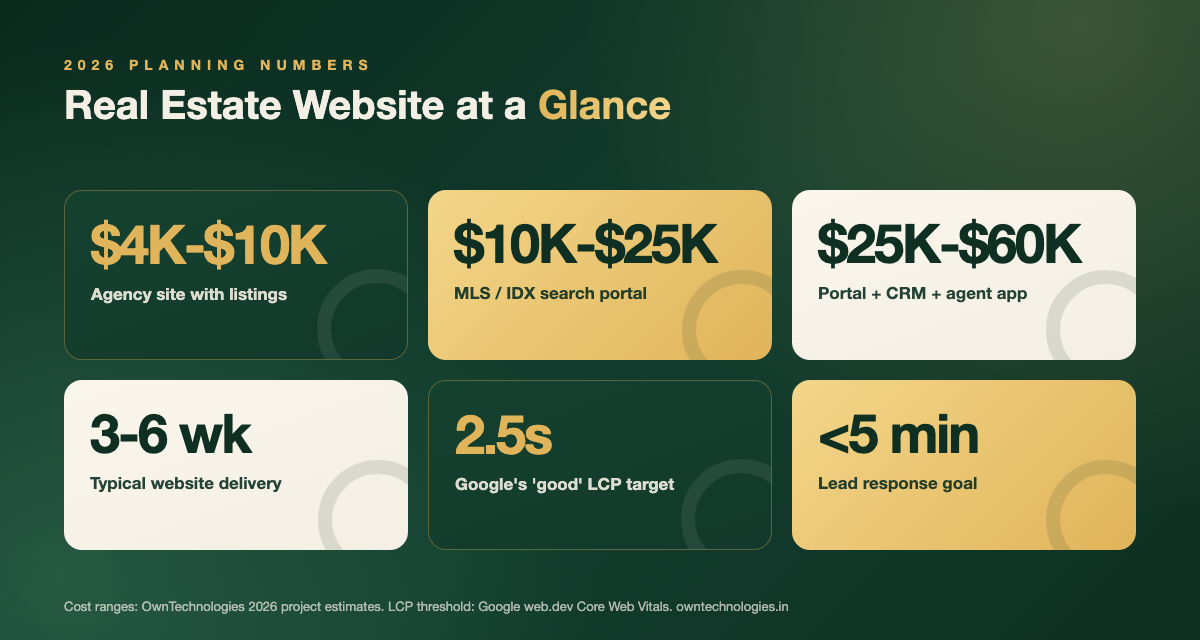
Aim for Google’s Core Web Vitals “good” thresholds, including a Largest Contentful Paint of 2.5 seconds or less, as explained on web.dev. For image-heavy real estate sites that means modern image formats, lazy loading for galleries, and a proper CDN.
For search visibility, the features that matter most are:
- Neighbourhood landing pages such as “3 BHK flats in Sector 57 Gurugram” or “condos for sale in Oakville”, each with real listings and local information.
- Structured data for listings, using the RealEstateListing schema, so search engines understand what each page is.
- Clean URLs that include the area and property type instead of random IDs.
- Expired listing handling that keeps sold pages live with similar properties, rather than turning them into 404 errors.
If your site already exists and ranks poorly, a technical SEO audit usually finds the quick wins in speed, indexing, and duplicate listing pages within a week.
Connecting Your Website to a Real Estate CRM
A website that generates enquiries but drops them into an email inbox is only doing half the job. The speed of your first reply often decides who gets the deal, so aim to respond within five minutes during working hours.
That is only realistic when every enquiry, whether it comes from a form, a WhatsApp click, or a visit booking, lands in a CRM automatically, gets assigned to the right agent by area or project, and triggers an instant acknowledgement to the buyer. Listings should also sync the other way, so a property marked sold in the CRM disappears from the website on its own.
We cover the CRM side in detail in our guide to real estate CRM software features. If you want both built together on one database, our CRM development team scopes them as a single project.
Features to Skip or Defer
Not every feature earns its cost, especially in version one. These are often requested and rarely move enquiries:
- Full buyer accounts with passwords: saved searches by email or phone do the same job with far less friction.
- Heavy 3D animations on the homepage: they slow the site and buyers skip straight to search anyway.
- A chatbot that cannot answer property questions: a WhatsApp button to a real agent converts better than a bot that loops.
- A separate mobile app on day one: a fast mobile website covers most buyers. Consider an app later for agents or repeat investors.
- Pop-ups on the first second of a visit: show a subscribe prompt after a buyer has viewed a few listings, not before.
Real Estate Website Cost in 2026
The cost depends mostly on how listings get onto the site and how much of the enquiry process you automate. Here are typical 2026 ranges from an experienced offshore or hybrid team.
| Website type | Typical scope | 2026 cost range | Timeline |
|---|---|---|---|
| Agency website with listings | Listings managed in an admin panel, filters, enquiry forms, WhatsApp, agent profiles | $4,000 to $10,000 (around 3.4 to 8.5 lakh INR) | 3 to 6 weeks |
| Search portal with MLS or IDX feed | Automatic listing import, map search, saved searches, alerts, neighbourhood pages | $10,000 to $25,000 (around 8.5 to 21 lakh INR) | 6 to 10 weeks |
| Developer or project launch site | Project pages, unit availability, brochure downloads, site visit booking | $6,000 to $18,000 (around 5 to 15 lakh INR) | 4 to 8 weeks |
| Portal plus CRM and agent app | Everything above plus lead routing, CRM, and a mobile app for agents | $25,000 to $60,000 (around 21 to 50 lakh INR) | 3 to 5 months |
For a line-by-line breakdown of what drives website pricing, see our custom website development cost guide. If your current site already gets traffic but few leads, it is also worth reading why business websites do not get leads before you commit to a full rebuild.
How OwnTechnologies Builds Real Estate Websites
We start with how your enquiries flow today: where leads come from, who answers them, and where they get lost. Then we design the search and listing pages around that flow, build in two-week sprints, and connect the site to your CRM before launch, not after. Most agency websites go live in 3 to 6 weeks depending on scope.
Our website development team has delivered 100+ projects for clients in 15+ countries, including the USA, Canada, the UK, the UAE, and Australia. You can see examples in our portfolio, and if you later want a dedicated app for agents, our app development team can build it on the same backend.
Frequently Asked Questions
At minimum: property search with location, budget, and bedroom filters, a map view, detailed listing pages with real photos and floor plans, a WhatsApp and call button on every listing, site visit booking, agent profiles, reviews, and automatic delivery of every enquiry into a CRM.
An agency website with listings typically costs $4,000 to $10,000 (around 3.4 to 8.5 lakh INR). A search portal with an MLS or IDX feed costs $10,000 to $25,000, and a full portal with CRM and an agent app costs $25,000 to $60,000.
Make contact effortless with a sticky Call, WhatsApp, and Book a Visit bar on mobile, keep forms to three or four fields, add saved search alerts so buyers return, show prices, and reply to every enquiry within minutes by routing leads into a CRM.
In the USA and Canada, IDX lets you show MLS listings on your own site, which makes your search useful to buyers and adds indexable pages. If you only sell your own inventory or you work in a market without an MLS, an admin panel for managing listings is usually enough.
An agency website with listings takes about 3 to 6 weeks. A search portal with MLS or IDX integration takes 6 to 10 weeks, and a portal with CRM and an agent app takes 3 to 5 months.
Final Thoughts
A real estate website that generates enquiries is not about more pages or flashier design. It comes down to four things: search that finds the right property fast, listing pages that answer the obvious questions, contact options that take one tap, and a CRM that makes sure every lead gets a reply in minutes. Get those right before adding anything else.
Want to know which of these features your current site is missing? Talk to OwnTechnologies for a free consultation. Send us your website link and we will come back with a short list of fixes and a phased estimate, no commitment required.