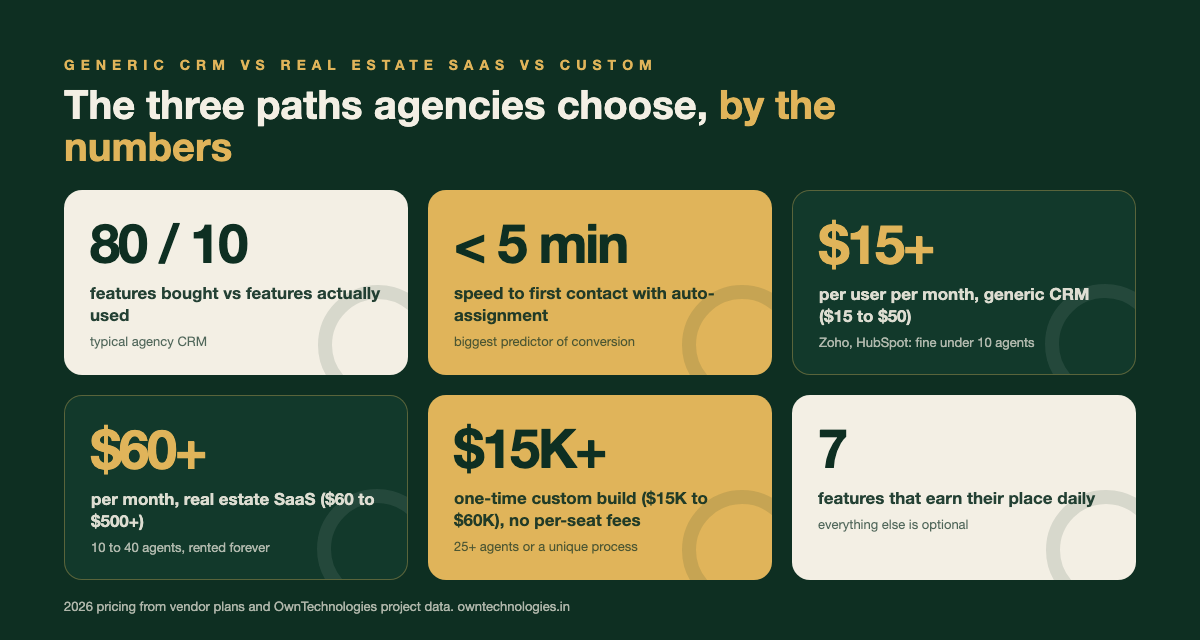
Most real estate agencies buy a CRM loaded with 80 features and end up using about 10 of them. The rest sit there unused, and the team keeps tracking leads on WhatsApp and a shared spreadsheet anyway.
This guide breaks down exactly which real estate CRM features agencies use every single day, which ones are marketing dressing you can skip, and how to choose or build a system that actually fits how your sales team works in 2026.
What a Real Estate CRM Is Actually For
Strip away the marketing language and a real estate CRM has one job: move a lead from “just browsing” to “signed and closed” without anyone falling through the cracks. Everything else is a feature competing for that one outcome.
Agencies that get real value from their CRM usually have three things in place before they even look at software: a defined lead source list, a written follow-up cadence, and someone who owns the pipeline daily. Without those, even the best CRM becomes an expensive contact list.
The Features Agencies Actually Use Every Day
These are the features that show up in daily use logs across the real estate CRMs we have built and maintained. If a CRM does these seven things well, it is doing its job.
| Feature | Why agencies actually use it | Daily use level |
|---|---|---|
| Lead capture and source tracking | Pulls leads from the website, Facebook and Google ads, portals, and walk-ins into one list, tagged by source | Very high |
| Automatic lead assignment | Routes a new lead to the right agent by territory or rotation within minutes, before a competitor calls first | Very high |
| WhatsApp and SMS follow-up sequences | Sends the first message and reminder texts automatically so no lead goes cold overnight | Very high |
| Deal pipeline by stage | Shows every lead as inquiry, site visit, negotiation, booking, or closed so managers see where deals stall | High |
| Site visit and showing scheduler | Books site visits, sends reminders to both agent and client, and logs the outcome | High |
| Property matching and saved alerts | Flags new inventory that matches a buyer’s budget and preferences automatically | Medium to high |
| Commission and payout tracking | Calculates what each agent earns per closed deal, which finance teams check weekly | Medium to high |
Lead capture and source tracking
Without source tracking, you cannot tell whether the money you spent on Facebook ads brought in better buyers than your Google campaign. A working CRM tags every lead by source automatically, so a monthly report showing cost per booking by channel takes one click instead of a manual audit.
Automatic lead assignment
Speed to first contact is the single biggest predictor of whether a real estate lead converts. Manual assignment in a WhatsApp group or Excel sheet means leads sit for hours. Rule-based routing by territory, language, or round robin gets a lead to an agent in under five minutes.
WhatsApp and SMS follow-up sequences
Most buyers do not answer a cold call from an unknown number. A CRM that sends an automatic WhatsApp message the moment a lead comes in, followed by a scheduled reminder if there is no reply in 48 hours, recovers leads that would otherwise be lost. This is the feature agencies say pays for the CRM within the first quarter.
Deal pipeline by stage
A pipeline view built around your actual sales stages, not a generic “lead, opportunity, won” template, is what lets a sales manager see in thirty seconds which deals have gone quiet. Custom stages such as “site visit done, awaiting decision” matter more in real estate than in most other industries because of the long, non-linear buying cycle.
Site visit and showing scheduler
Double-booked site visits and no-shows cost agents hours every week. A scheduler that blocks an agent’s calendar, sends the client a confirmation and reminder, and logs feedback after the visit removes most of that friction without needing a separate booking tool. See our guide on custom CRM development cost for what a scheduler module typically adds to a build.
Property matching and saved alerts
Agencies with active inventory over 50 units get real value from automatic matching, new listings that fit a buyer’s saved budget and location trigger an alert. Below that inventory size, agents usually just remember what fits and this feature sits unused.
Commission and payout tracking
Once an agency has more than five or six agents on different commission structures, tracking payouts in a spreadsheet becomes error-prone. A CRM that calculates commission automatically when a deal closes removes a recurring monthly headache for finance.
Features That Sound Good But Most Agencies Skip
These show up in almost every sales demo and almost never in daily use. They are not bad ideas, they are just wrong for most agency sizes.
- Full MLS-style listing management: Building a complete listing syndication system makes sense for a large brokerage managing thousands of units, not a 10 to 30 agent agency that already lists on portals like the major property sites.
- AI lead scoring bots: Useful once you have thousands of leads a month to train against. Below that volume, an experienced sales manager scores leads more accurately by gut feel.
- Built-in virtual tour hosting: Most agencies already use a dedicated tool or YouTube for virtual tours and just paste the link into the CRM. Hosting it natively adds cost without adding usage.
- Heavy marketing automation suites: Multi-step email campaign builders with A/B testing are built for demand-gen teams, not a real estate sales desk. A simple WhatsApp and SMS sequence covers 90 percent of what agencies actually send.
- Multi-currency and multi-language billing: Only worth building if you regularly sell to international buyers. Otherwise it is complexity with no user behind it.
Generic CRM vs Real Estate CRM vs Custom Build
Agencies usually choose between three paths. Each is right for a different stage of growth.
| Option | Best for | 2026 cost (USD) | Limitation |
|---|---|---|---|
| Generic CRM (Zoho, HubSpot) | Agencies under 10 agents, testing their process | $15 to $50 per user, per month | No real estate stages or property matching out of the box |
| Real estate specific SaaS (Follow Up Boss and similar) | 10 to 40 agent agencies wanting industry features fast | $60 to $500+ per month depending on team size | You rent it forever and cannot change core workflow logic |
| Custom real estate CRM | 25+ agent agencies or brokerages with a unique sales process | $15,000 to $60,000 one-time build | Higher upfront cost, but no per-seat pricing and full control |
Industry research from the National Association of Realtors consistently shows that technology adoption and speed to lead are among the top factors separating high performing agents from the rest, which is exactly what the “actually used” features above are built to fix. SaaS pricing references such as Follow Up Boss’s published plans give a useful benchmark if you are comparing a subscription against a one-time build.
If you are still weighing a subscription against owning your system outright, our build vs buy vs customize framework walks through the decision with the same logic applied to any industry.
A Real Estate CRM Workflow That Actually Works
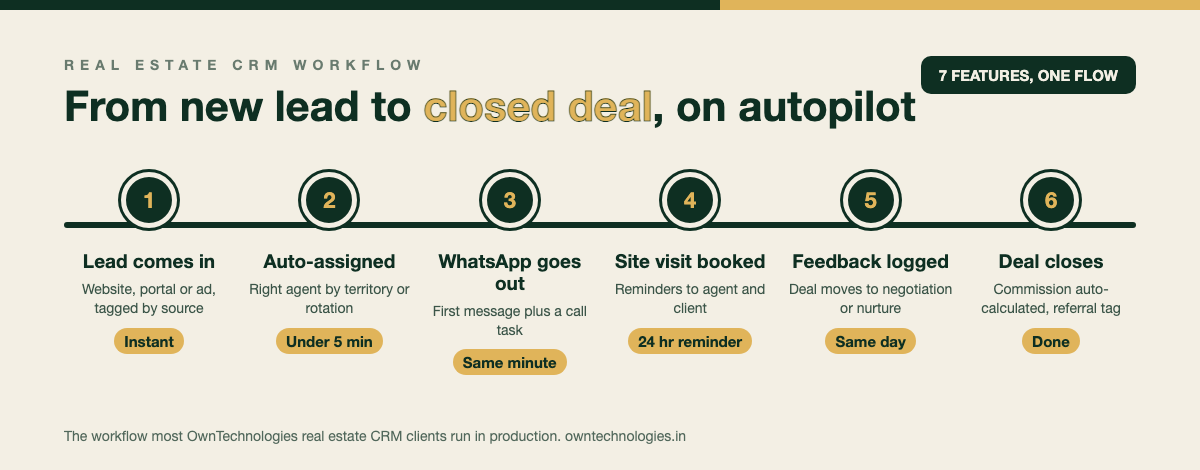
Here is what the seven core features look like strung together as one workflow, the version most of our real estate CRM clients run in production.
- Lead comes in from the website, a portal, or an ad, tagged with source automatically.
- Auto-assignment routes it to the right agent by project or territory within minutes.
- WhatsApp message goes out instantly, followed by a call task for the agent.
- Site visit is booked in the scheduler, with reminders sent to both sides 24 hours before.
- Feedback is logged after the visit, moving the deal to negotiation or back to nurture.
- Deal closes, commission calculates automatically, and the client moves to a post-sale tag for referrals.
Every step above is a feature from the “actually used” table. Nothing exotic, just connected properly so no lead sits waiting for a human to remember it.
Mistakes Agencies Make When Choosing a Real Estate CRM
- Buying for the demo, not the daily grind. A flashy dashboard in a sales call rarely predicts what agents will actually open every morning.
- Skipping WhatsApp integration. In most markets outside the US, a CRM without native WhatsApp is a CRM agents will work around.
- No one owns adoption. Without a sales manager checking the pipeline daily and holding agents accountable, even a perfect CRM goes unused within a month.
- Migrating data without cleaning it first. Importing years of duplicate, stale contacts just moves the mess into the new system.
- Ignoring mobile use. Agents are in the field, not at a desk. If the mobile experience is clunky, they will fall back to WhatsApp and a notebook.
How to Choose the Right Real Estate CRM for Your Agency
Match the option to your size and growth plan rather than the feature count on a pricing page.
- Under 10 agents: start with a generic CRM and a WhatsApp follow-up habit. Prove the process before paying for automation.
- 10 to 25 agents: a real estate specific SaaS tool with lead routing and WhatsApp built in is usually the fastest path to results.
- 25+ agents or multiple branches: a custom CRM stops being a luxury and starts being cheaper than per-seat SaaS pricing, while matching your exact sales stages. Our CRM development team has built real estate CRMs for agencies at this stage, including work referenced in our portfolio.
- Need a client-facing app too: if buyers should be able to browse listings or track their booking status themselves, that is a separate mobile build. See our app development team for scope and pricing on that side.
Frequently Asked Questions
Lead capture with source tracking, automatic lead assignment, WhatsApp or SMS follow-up sequences, a deal pipeline by stage, a site visit scheduler, property matching, and commission tracking. These seven cover what agencies actually use every day.
Yes. A real estate CRM needs stages built around site visits and negotiations rather than a generic sales funnel, plus property matching and commission tracking that a general CRM does not include out of the box.
Generic CRMs run $15 to $50 per user per month. Real estate specific SaaS tools run $60 to $500 or more per month depending on team size. A custom real estate CRM typically costs $15,000 to $60,000 as a one-time build.
Usually not. Agencies under 25 agents are typically better served by a generic or real estate specific SaaS CRM. Custom builds pay off once per-seat SaaS costs exceed the cost of owning the system outright, usually around 25 or more users.
The most common reasons are missing WhatsApp integration, no one owning daily pipeline review, and buying a CRM for its demo features instead of the handful agents actually need every day.
Yes, but it is usually scoped as a separate mobile app connected to the same CRM database, so buyers can browse listings or track a booking while agents work from the core CRM.
Final Thoughts
A real estate CRM does not need eighty features to work, it needs seven done well and a team that actually opens it every morning. Start with lead capture, assignment, WhatsApp follow-up, and a pipeline that matches how your agency really sells, then add the rest only once you can prove it will get used.
Not sure whether your agency needs a SaaS tool or a custom build? Talk to OwnTechnologies for a free scoping call. Tell us how leads move through your team today and we will send back a phased recommendation within 48 hours, no commitment required.