Your customers are already on WhatsApp. Most sales and support teams are still stuck answering the same questions over email and SMS, where replies get missed and follow-ups fall through the cracks.
This guide covers what the WhatsApp Business API actually does, the real use cases for sales and support teams, what integration costs in 2026, and how to connect it to the CRM or helpdesk you already use.
What Is the WhatsApp Business API (and How It Differs From the App)
The free WhatsApp Business App is built for a single phone and one or two people replying manually. The WhatsApp Business API is built for teams. It lets multiple agents share one number, connects to your CRM or helpdesk, and supports automated replies, templates, and chatbots at scale.
You cannot install the API directly. You access it through a Business Solution Provider (BSP) such as Twilio, Gupshup, or MessageBird, or through Meta’s own onboarding flow. Meta publishes its current conversation-based pricing for the API, and BSPs add their own platform fee on top.
Why Sales and Support Teams Are Moving to WhatsApp in 2026
Email sits in an inbox until someone checks it. SMS is limited to 160 characters and cannot carry images, PDFs, or payment links. WhatsApp does all of it in one thread the customer already has open on their phone.
| Channel | Typical read time | Rich content | Two-way conversation |
|---|---|---|---|
| Minutes, app stays open on the phone | Images, PDFs, catalogs, payment links, buttons | Yes, in one ongoing thread | |
| Hours to days | Attachments, but formatting varies | Yes, but threads get buried | |
| SMS | Minutes, but often ignored as spam | Text only, 160 characters | Limited, no rich replies |
| Phone call | Immediate if answered | None | Yes, but not scalable or searchable |
That single thread is what makes WhatsApp useful for both sales and support. A lead can move from first question to paid customer without ever leaving the conversation.
Top WhatsApp API Use Cases for Sales Teams
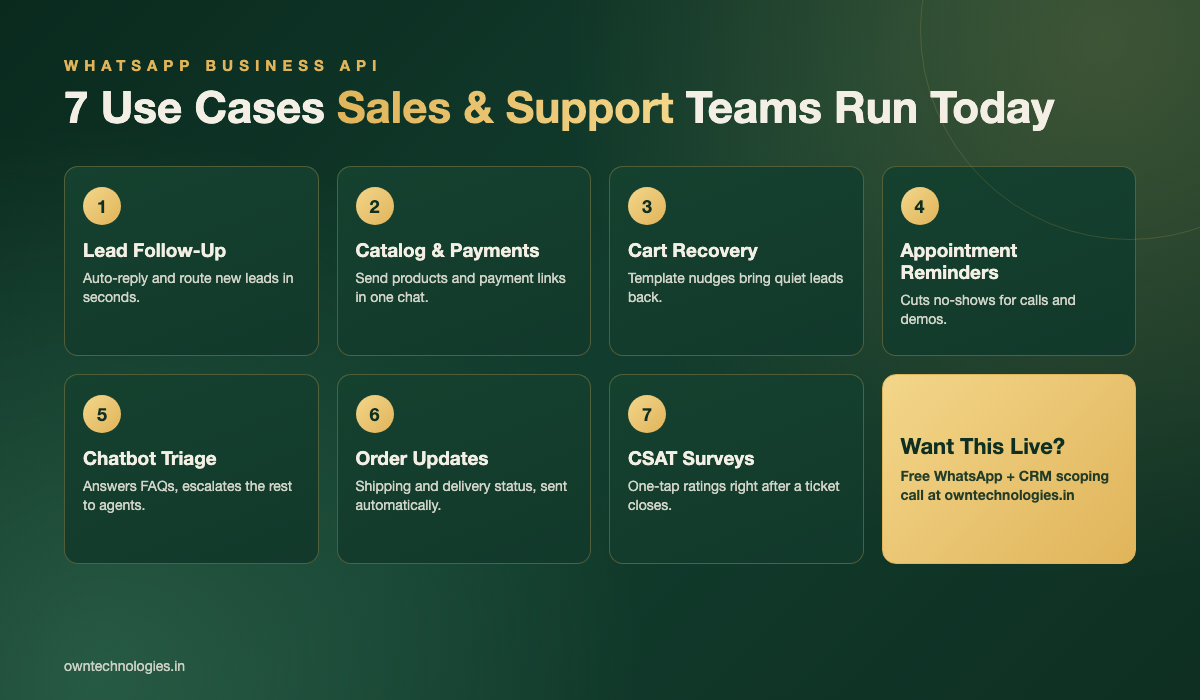
- Click-to-WhatsApp ad follow-up: A lead taps a Facebook or Instagram ad and lands straight in a WhatsApp chat with your team, with zero form-fill friction.
- Instant lead response: Auto-reply within seconds, then route the lead to the right sales rep based on product interest or location.
- Catalog and payment links: Send a product catalog, a quote, or a payment link inside the same chat instead of emailing a PDF.
- Abandoned cart or quote recovery: A template message reminds a lead who went quiet, with a direct link back to checkout or the quote.
- Appointment and demo reminders: Automated reminders cut no-shows for sales calls, site visits, and demos.
- Segmented broadcasts: Send offers or updates to an opted-in list, something SMS charges more for and email often gets filtered out.
Top WhatsApp API Use Cases for Support Teams
- Chatbot triage: Answer common questions (hours, pricing, order status) instantly and hand off only the complex cases to a human agent.
- Order and delivery updates: Push shipping, delivery, and refund status automatically instead of making customers ask.
- Ticket creation and routing: A message becomes a ticket in your helpdesk, assigned to the right team without manual copy-paste.
- Proactive outage or delay alerts: Notify affected customers before they contact you, which cuts inbound ticket volume.
- Post-resolution CSAT surveys: A one-tap satisfaction rating sent right after a ticket closes gets far higher response than an emailed survey link.
WhatsApp Business API vs WhatsApp Business App
| Feature | WhatsApp Business App | WhatsApp Business API |
|---|---|---|
| Best for | Solo owners, small shops | Sales and support teams of any size |
| Number of agents | 1 phone, limited linked devices | Unlimited agents on one number via CRM or helpdesk |
| CRM or helpdesk integration | None | Yes, via API |
| Automated replies and chatbots | Basic away messages only | Full automation, chatbot flows, template messages |
| Cost | Free | Conversation-based pricing plus BSP fees |
| Green verification badge | Not available | Available after Meta business verification |
What WhatsApp Business API Integration Costs in 2026
Meta charges per conversation once a business-initiated template message opens a 24-hour window, and BSPs like Twilio add a small markup plus a monthly platform fee. The bigger cost is usually the integration work, not the messaging itself.
| Setup type | What is included | 2026 cost range (USD) |
|---|---|---|
| Self-serve BSP account | BSP dashboard only, manual replies, no CRM connection | $0 to $500 setup (around 40,000 INR), plus per-message fees |
| BSP with basic CRM integration | Leads and conversations sync into your existing CRM, simple automated replies | $1,500 to $5,000 (around 1.2 lakh to 4 lakh INR) |
| Custom integration with chatbot | Two-way sync with CRM or helpdesk, chatbot triage, ticket routing, reporting | $5,000 to $15,000 (around 4 lakh to 12 lakh INR) |
| Enterprise, multi-department | Multiple numbers, role-based routing, analytics dashboards, custom workflows | $15,000+ (around 12 lakh INR and up) |
If you already run a custom CRM, WhatsApp is usually one more integration inside it rather than a separate system. Our guide on custom CRM vs Zoho vs HubSpot covers how these platforms handle WhatsApp connections differently.
How to Integrate WhatsApp Business API With Your CRM or Helpdesk
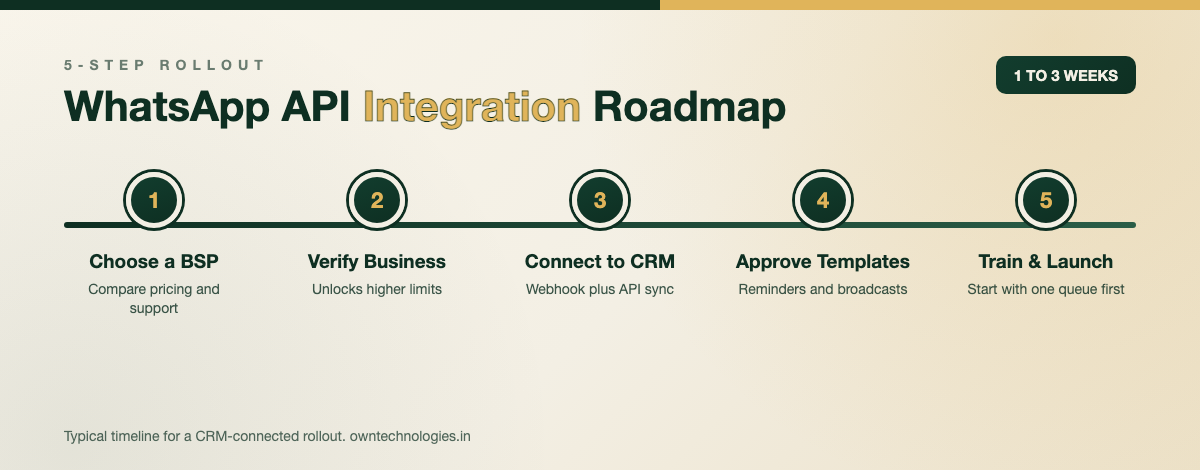
- Choose a BSP or Meta direct onboarding. Compare pricing model, template approval speed, and whether they support your region.
- Complete Meta business verification. This unlocks higher messaging limits and the option to apply for the green checkmark.
- Connect the API to your CRM or helpdesk. This is usually a webhook plus API calls, either through your provider’s native connector or a custom build for a proprietary system like yours.
- Build and submit message templates. Order updates, reminders, and broadcasts need pre-approved templates before they can be sent outside the 24-hour reply window.
- Train your team and launch with a small segment first. Test routing rules and chatbot flows on one product line or support queue before rolling out company-wide.
Teams that already run a custom-built CRM tend to move faster here, since the WhatsApp API is added as one more data source rather than a rebuild. If your current system cannot support this kind of integration, our CRM development team can scope the connection alongside any other gaps in the platform.
Choosing a WhatsApp Business Solution Provider: What to Check
- Pricing transparency: Ask for the per-conversation rate for your country plus any monthly platform fee, not just a headline number.
- Template approval turnaround: Some BSPs get templates approved in hours, others take days during busy periods.
- Uptime and support SLA: Messaging downtime during a sale or launch is expensive. Ask what the guaranteed uptime is and how support is reached.
- Developer support for custom builds: If you need a non-standard integration, confirm the BSP exposes a full API and documentation, not just a plug-and-play widget.
- Data residency and security: Ask where conversation data is stored and whether it meets your industry’s compliance needs.
Compliance Rules You Need to Know
WhatsApp’s messaging rules exist to stop spam, and getting them wrong can get a business number restricted. The details are documented in Meta’s developer pricing and policy docs, but the parts that matter most for sales and support teams are simple.
- Opt-in first. You need explicit permission before sending a business-initiated message to a customer, not just a phone number you collected elsewhere.
- The 24-hour session window. Once a customer messages you, you can reply freely for 24 hours. Outside that window, only pre-approved templates can be sent.
- Template categories matter. Marketing, utility, and authentication templates are reviewed differently, and marketing templates cost more per conversation.
- Quality rating affects your limits. Too many blocks or complaints lower your messaging tier, so keep broadcasts relevant and easy to opt out of.
Getting the policy setup right the first time avoids a restricted number in the middle of a busy sales quarter. If you are still weighing which development partner should handle this alongside your CRM, our post on how to choose a CRM development company lists the checks worth making before you sign.
Frequently Asked Questions
The API itself has no license fee, but Meta charges per conversation once a business-initiated template opens a 24-hour session, and most Business Solution Providers add a platform fee on top. Costs typically start under $500 a month for a small team.
A basic setup through a BSP dashboard can be done without a developer. Connecting it to your CRM or helpdesk, building chatbot flows, or routing tickets automatically usually needs a developer or an integration partner.
Yes, most modern CRMs and helpdesks support a WhatsApp connection either natively or through a BSP’s API. If your CRM is older or custom-built, the integration may need custom development work.
A basic BSP integration with an existing CRM typically takes 1 to 3 weeks. A custom build with chatbot triage, ticket routing, and reporting usually takes 4 to 8 weeks.
The App is a free single-phone tool for solo owners with manual replies. The API supports multiple agents on one number, connects to a CRM or helpdesk, and allows automated and template messaging at scale.
Yes, but only to customers who have opted in, and only using a pre-approved marketing template outside the 24-hour session window. Sending unsolicited promotional messages risks the number being restricted.
Final Thoughts
WhatsApp is no longer a nice-to-have channel. For sales, it shortens the path from ad click to paid customer. For support, it moves routine questions out of the inbox and into a channel customers already check every few minutes. The businesses getting the most out of it are the ones who connect it directly to their CRM instead of running it as a separate inbox.
Want WhatsApp connected to a CRM built around how your team actually sells and supports customers? Talk to OwnTechnologies for a free scoping call, and if your customer-facing site also needs a chat entry point, our website development team can wire that up in the same project.