Most small businesses start their CRM search with the same three names: Zoho, HubSpot, and “should we just build our own.” Each one has loud fans, and each one is right for a different kind of team.
This is an honest comparison, not a sales pitch for custom software. Some businesses genuinely save money and headaches by staying on Zoho or HubSpot. Others outgrow both within a year. Here is how to tell which camp you are in, with real 2026 numbers.
Custom CRM vs Zoho vs HubSpot: The Quick Answer
For a small business under 10 users with standard sales needs, Zoho CRM is usually the cheapest way to get organized fast. HubSpot is the strongest choice if marketing and sales need to live in one system and budget is not the main constraint. A custom CRM pays off once your workflow does not fit either tool, or once you are paying for features across two or three SaaS products that a single custom build could replace.
None of the three is “best” in the abstract. The right one depends on team size, how unusual your sales process is, and whether you plan to still be using the same system in three years.
Most founders reach for whichever CRM a friend recommended, sign up, and figure out the fit later. That works out fine for some. Others spend a year paying for a tool that fights their process every day, then rebuild from scratch anyway. The comparison below is meant to save you that year.
What Zoho CRM Gives a Small Business
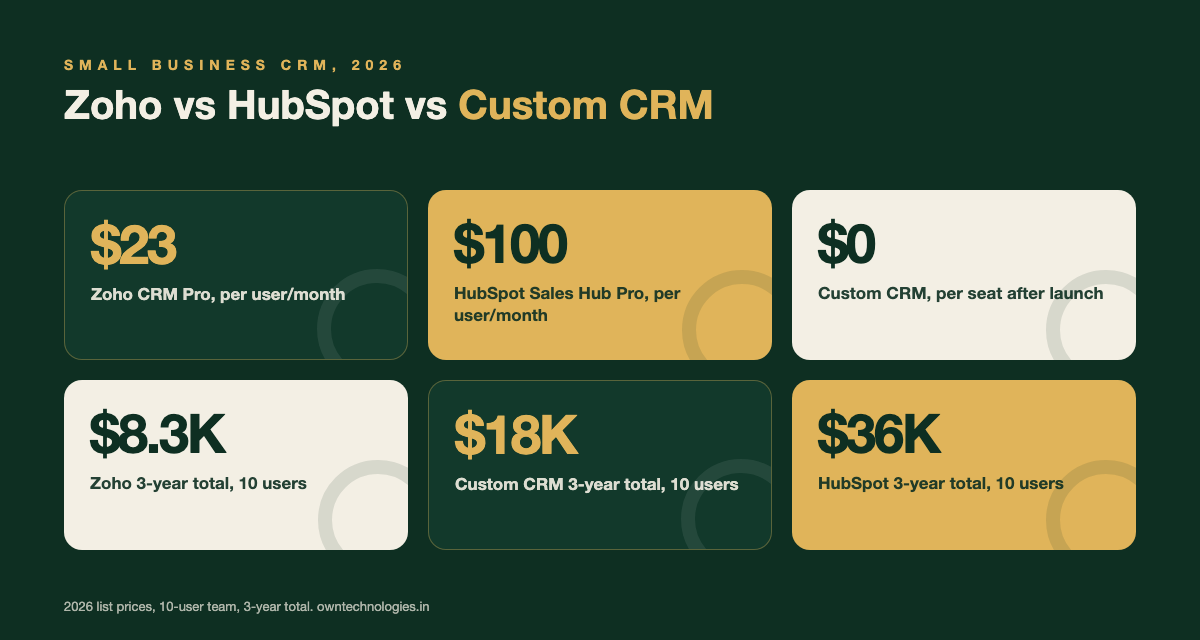
Zoho CRM is the value option of the three. The Professional plan runs around $23 per user per month (roughly 1,900 INR) in 2026 and includes lead and contact management, a visual pipeline, workflow automation, and basic email integration. The Enterprise plan adds advanced customization and AI features for around $40 per user per month.
Where it falls short: the interface looks dated next to HubSpot, deep customization needs a Zoho consultant, and it does not feel purpose-built for any one industry. If your sales process is standard (leads in, calls made, deals closed), Zoho covers it without friction.
What HubSpot Gives a Small Business
HubSpot’s strength is that Marketing Hub, Sales Hub, and Service Hub share one contact database, so a lead’s website visits, email opens, and deal history sit in one timeline. Sales Hub Professional lists at around $100 per user per month (roughly 8,300 INR) in 2026 on the official HubSpot pricing page, with a 3-seat minimum, so smaller teams pay for seats they may not use yet.
Where it falls short: cost climbs fast once you add contacts beyond the plan limit or move into Marketing Hub, and the automation you actually want is often gated behind the Professional or Enterprise tier. It is the best-looking option in a demo and the most expensive one to run at scale.
What a Custom CRM Gives a Small Business
A custom CRM is built around your exact sales process instead of asking you to adapt to someone else’s. For a small business, a basic to mid-scope build with contact management, a pipeline, and automated WhatsApp or email follow-ups typically costs $10,000 to $20,000 (roughly 8 to 16.5 lakh INR), with no per-seat charge afterward. See our full custom CRM development cost guide for the complete breakdown by scope.
Where it falls short: there is an upfront cost and a 4 to 8 week wait before launch, and you are relying on one development partner rather than a large SaaS company’s support team. It only makes sense once your process is specific enough, or your user count is high enough, that a one-time build beats renting software forever.
Feature Comparison Table
| Feature | Zoho CRM | HubSpot | Custom CRM |
|---|---|---|---|
| Setup time | 1 to 3 days | 3 to 7 days | 4 to 8 weeks |
| Marketing + sales in one tool | Add-on module | Built in (paid tier) | Built to order |
| Industry-specific workflow | Limited, needs consultant | Limited, needs consultant | Native, built for you |
| Per-user monthly cost | Low to medium | Medium to high | None after launch |
| Data ownership | Zoho’s servers | HubSpot’s servers | You own it fully |
| Cost as team grows | Scales per seat | Scales per seat, fast | Flat, hosting only |
Real Cost Comparison Over 3 Years
Comparing a monthly SaaS price against a one-time build is misleading unless you look at the same time period. Here is the honest math for a 10-user small business team over three years.
| Option (10 users) | Year 1 | Years 2 to 3 | 3-year total |
|---|---|---|---|
| Zoho CRM Professional | ~$2,760 | ~$5,520 | ~$8,280 |
| HubSpot Sales Hub Professional | ~$12,000 | ~$24,000 | ~$36,000 |
| Custom CRM (basic to mid scope) | $12,000 build + $2,000 support | ~$4,000 support | ~$18,000 |
The honest takeaway: at 10 users, Zoho is still the cheapest option in raw dollars over three years. Custom pulls ahead of HubSpot by year two but does not beat Zoho unless your team is bigger, growing fast, or needs workflows Zoho cannot handle without a costly consultant. Pricing shown is based on published 2026 list prices from Zoho’s pricing page and HubSpot’s pricing page above, and will vary with discounts and add-ons.
When Zoho Is the Right Choice
- Your sales process is standard: leads come in, get called, get closed
- Budget matters more than a polished interface
- You have under 15 users and no plans to double headcount this year
- You do not need marketing and sales data in one system
When HubSpot Is the Right Choice
- Marketing and sales need to share the same contact timeline
- You already run HubSpot Marketing Hub or plan to
- Ease of use matters more than per-seat cost
- Your sales cycle is standard enough that native features cover it without customization
When a Custom CRM Is the Right Choice
- Your workflow is industry-specific (real estate site visits, patient intake, logistics dispatch) and does not fit a generic pipeline. Our real estate CRM features guide shows what that looks like in practice
- You are paying for two or three SaaS tools that duplicate each other
- You have 20 or more users, where per-seat SaaS pricing adds up fast
- You want to own the code and data outright with no vendor lock-in
How to Decide: A 5-Step Framework
Skip the demos for a moment and work through this before you sign anything. It takes 20 minutes and stops you from buying the wrong tool twice.
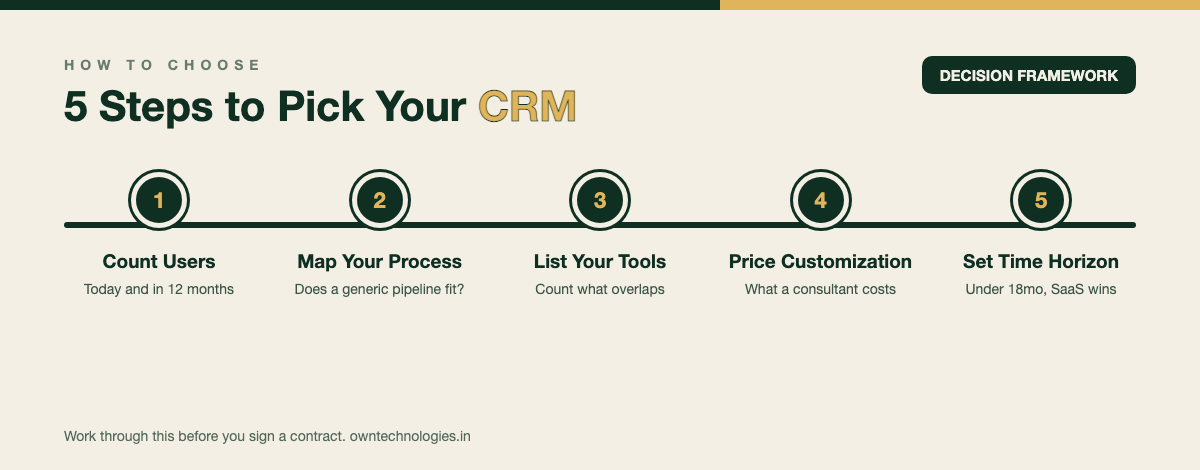
- Count your users today and in 12 months. Per-seat pricing changes the entire math above 15 to 20 users.
- Write down your actual sales steps. If a SaaS tool’s default pipeline matches yours in under 30 minutes of setup, that is a strong signal to stay on SaaS.
- List every tool you currently pay for that touches leads. If it is three or more, a custom build that merges them may cost less than the SaaS stack alone.
- Ask what a consultant would charge to customize Zoho or HubSpot to your process. Heavy customization on either platform can approach half the cost of a basic custom build, without you owning anything at the end.
- Decide your time horizon. Under 18 months, SaaS wins on speed. Three years or more with steady growth, run the math in the table above again with your real user count.
Frequently Asked Questions
Yes, for most small businesses with a standard sales process and under 15 users, Zoho CRM Professional covers contact management, pipeline tracking, and basic automation for around $23 per user per month in 2026, making it the cheapest of the three options.
HubSpot bundles marketing, sales, and service data into one contact record and charges a premium for that integration. Sales Hub Professional lists at around $100 per user per month with a 3-seat minimum, versus roughly $23 for a comparable Zoho tier.
Custom CRMs typically become cost competitive with HubSpot around 10 users and cheaper than Zoho over three years once you pass roughly 20 to 25 users, since SaaS pricing scales per seat while a custom build’s cost stays mostly flat after launch.
Yes. Data migration from either platform is a well understood process. Most development teams can export contacts, deal history, and notes through the platform’s API and import them into a custom system within one to two weeks.
For basic workflow automation, no. For deeper customization such as custom objects, industry-specific fields, or complex integrations, most businesses hire a certified consultant or developer, which adds ongoing cost on top of the subscription.
Final Thoughts
There is no universally right answer between Zoho, HubSpot, and custom. Zoho wins on price for small standard teams. HubSpot wins when marketing and sales need to be one system. Custom wins once your process, your headcount, or your tool stack has outgrown what either SaaS platform does well.
The mistake to avoid is picking based on which tool has the nicest demo. Run the numbers in the table above with your actual user count, be honest about whether your process fits a generic pipeline, and revisit the decision once a year as your team grows.
Not sure which camp you are in? Talk to OwnTechnologies for a free, no-pressure assessment. Tell us your current sales process and tool stack, and we will tell you honestly whether staying on SaaS or building custom saves you more, with real numbers. See examples of what we have built in our portfolio, or start with our CRM development team if you already know custom is the direction.