Your website gets visitors, but most of them leave without filling in the contact form. Many of those same people would happily send you a WhatsApp message, because that is where they already talk to friends, family, and the businesses they trust.
This guide covers WhatsApp integration for business websites: the five use cases that actually turn visitors into leads and bookings, which setup you need for each, the mistakes that waste the opportunity, and what it costs in 2026.
Why Your Website Needs WhatsApp, Not Just a Contact Form
A contact form asks the visitor to do all the work: type their details, write a message, then wait without knowing when or if you will reply. A WhatsApp button flips that. One tap opens a chat they already know how to use, and they can see when you have read and answered.
For service businesses such as clinics, salons, coaching centres, restaurants, and contractors, that speed matters. The first business to reply often wins the customer. WhatsApp also keeps the conversation going after the visit, so a lead who is not ready today can come back to the same chat next week.
This post focuses on the website side. If you want the full picture of using the WhatsApp Business API for sales and support teams, read our guide to WhatsApp Business API integration.
Click-to-Chat Link vs Chat Widget vs API: Which One You Need
There are three levels of WhatsApp website integration. Most businesses should start at the first and move up only when the volume justifies it.
| Setup | What it does | Best for | Needs the API? |
|---|---|---|---|
| Click-to-chat link | A button that opens WhatsApp with your number and a pre-filled message | Small businesses, one person replying | No |
| Chat widget | A floating chat bubble with greeting text, team members, and office hours | Businesses with 2 to 5 people replying | No (basic) or Yes (shared inbox) |
| API integration | Automatic messages from your website: form replies, booking confirmations, order updates, CRM sync | Growing businesses with steady lead or order volume | Yes |
The click-to-chat link is free and officially supported. WhatsApp explains the format in its guide to click-to-chat links. Automated messages need the WhatsApp Business Platform, which charges per message on top of your setup cost.
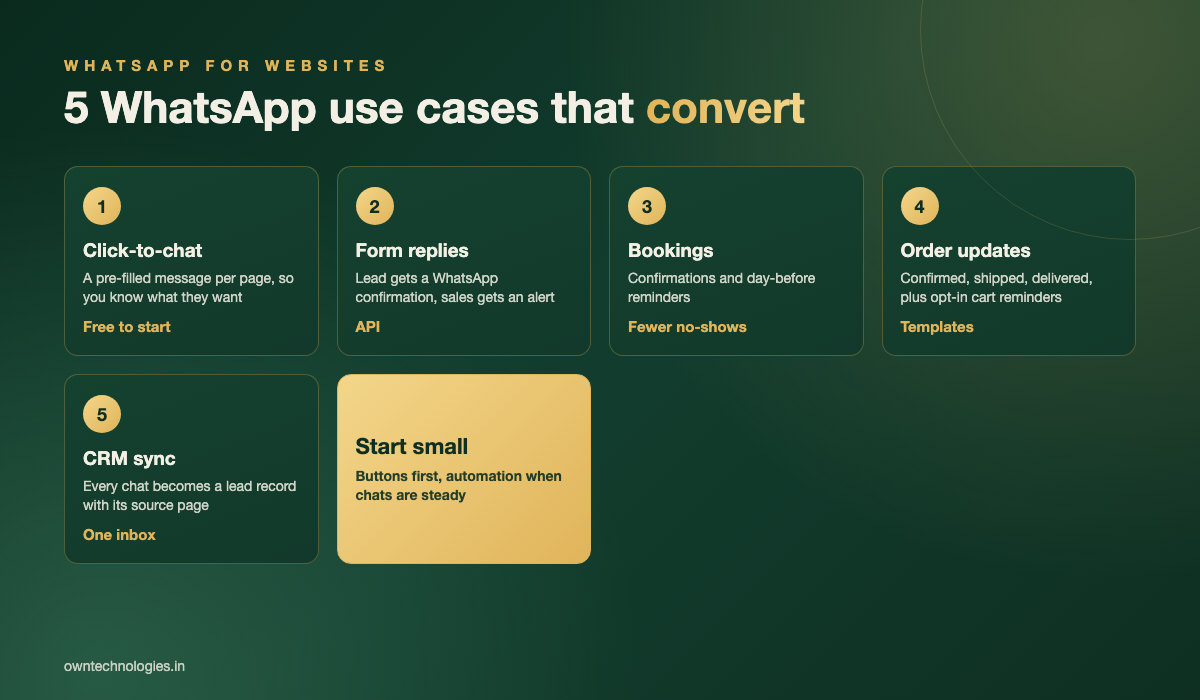
Use Case 1: Page-Specific Click-to-Chat Buttons
Most websites add one generic green bubble that says “Chat with us”. It works, but it throws away context. When the chat opens, you have no idea which service the visitor was looking at, so the first three messages are spent working that out.
A better setup gives each important page its own pre-filled message:
- Service page: “Hi, I’d like a quote for teeth whitening.”
- Pricing page: “Hi, I have a question about the Standard plan.”
- Course page: “Hi, when does the next IELTS batch start?”
- Product page: “Hi, is the oak dining table available in 6 seats?”
Your team now knows exactly what the person wants before they say hello. Add a UTM-tagged link or a short code in the message and you can also see which pages produce the most chats.
Use Case 2: Enquiry Forms That Reply on WhatsApp
Some visitors still prefer a form, and some leads arrive from ads with a form attached. The problem is the silence after they press Submit. With an API integration, the moment a form is submitted two things happen automatically:
- The lead receives a WhatsApp message confirming you got their request, with what happens next and when.
- Your sales person receives an alert with the lead’s name, service, and phone number, so they can reply in minutes instead of hours.
Make sure the form includes a clear opt-in line such as “Send me updates on WhatsApp”. Meta’s WhatsApp Business messaging policy requires permission before you message people, and asking upfront also keeps your number in good standing.
Use Case 3: Booking Confirmations and Reminders
If customers book appointments, tables, classes, or site visits on your website, WhatsApp is the most effective place to confirm them. Emails get buried. A WhatsApp message gets read.
A typical flow looks like this: a booking confirmation straight after the booking, a reminder the day before with a one-tap “Confirm” or “Reschedule” reply, and a short thank-you or review request after the visit. Fewer no-shows means more revenue from the same calendar.
This works best when your booking system and WhatsApp share the same data. We cover the booking side in detail in our guide to booking and appointment software for service businesses.
Use Case 4: Order Updates and Cart Recovery
For online stores and restaurants with online ordering, WhatsApp can replace a stack of emails and SMS:
- Order confirmed, with the order number and total
- Out for delivery, with the tracking link
- Delivered, with a link to rate the order
- A single reminder for an abandoned cart, only for customers who opted in
Customers reply to these messages with questions, which turns a one-way notification into a support channel. Each of these messages must use a pre-approved template, so plan the wording before development starts. If you are still planning the store itself, see our breakdown of e-commerce website development cost.
Use Case 5: Every Chat Logged in Your CRM
The hidden cost of WhatsApp is chaos. Leads sit in one person’s phone, nobody knows who replied to whom, and when that person is on leave the conversations stop. Connecting your website chats to a CRM fixes this.
With a CRM connection, every new chat creates or updates a lead record, notes which page it came from, assigns it to the right person, and keeps the full history. Your team can see what is open, what is waiting on a reply, and which pages bring in the best leads. This is the kind of system we build through our CRM development service.
Mistakes That Kill WhatsApp Conversions
- No reply for hours: a WhatsApp button sets an expectation of speed. Show office hours and send an automatic greeting outside them.
- A button that covers the page: on mobile, a large floating bubble can hide the Book or Buy button. Keep it small and test on a real phone.
- A personal number: use WhatsApp Business at minimum, so you get a business profile, catalogue, and quick replies.
- Messaging without permission: sending promotions to people who never opted in leads to blocks and reports, which can restrict your number.
- No tracking: if you cannot tell how many chats came from your website, you cannot improve it.
What WhatsApp Website Integration Costs in 2026
Costs depend on whether you only need buttons or a fully automated setup. These are typical ranges with an experienced team:
| Setup | What is included | Typical cost | Timeline |
|---|---|---|---|
| Click-to-chat buttons | Page-specific buttons and pre-filled messages, click tracking | $100 to $400 (around 8,000 to 33,000 INR) | 1 to 3 days |
| Chat widget with shared inbox | Floating widget, greeting, office hours, team routing through a provider | $300 to $1,000 (around 25,000 to 83,000 INR) plus provider fees | 1 to 2 weeks |
| Form and booking automation | API setup, form replies, booking confirmations and reminders, templates | $1,500 to $5,000 (around 1.2 lakh to 4 lakh INR) | 2 to 5 weeks |
| Full integration | Order updates, cart recovery, two-way CRM sync, reporting | $5,000 to $15,000 (around 4 lakh to 12 lakh INR) | 5 to 10 weeks |
API setups also pay Meta’s per-message charges, which depend on the country and message type. For most small businesses these are far smaller than the setup cost. If your website itself needs work before adding WhatsApp, our website development team can handle both together.
How to Roll Out WhatsApp on Your Website: 5 Steps
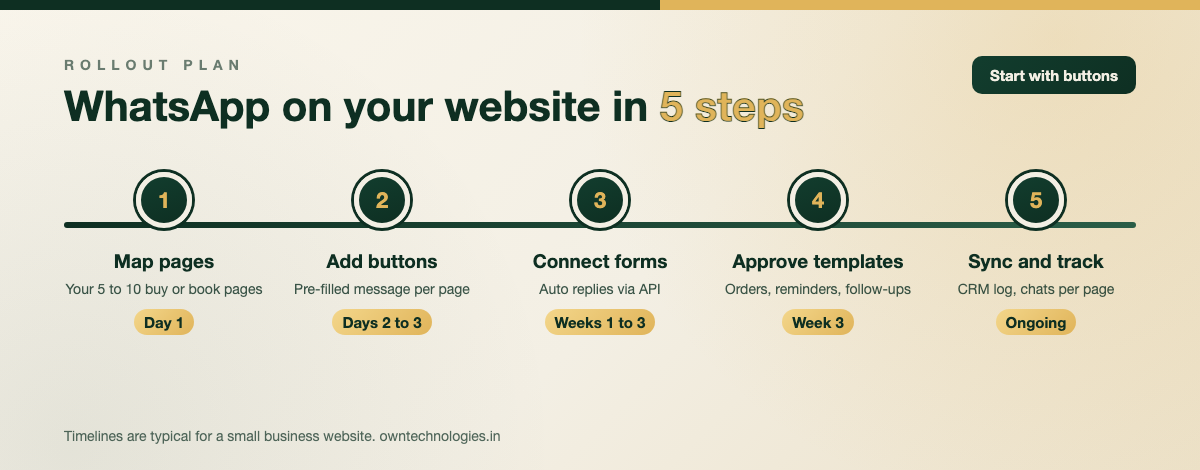
- Map your money pages: list the 5 to 10 pages where visitors decide to buy or book.
- Add click-to-chat buttons: one pre-filled message per page, with tracking.
- Connect forms and bookings: move to the API when chat volume is steady, starting with form replies and booking confirmations.
- Get templates approved: write and submit order, reminder, and follow-up templates.
- Sync to your CRM and track: log every chat, measure chats per page, and improve the pages that underperform.
Once chats are flowing, more traffic means more conversations. Pair this with our SEO services to grow the visitors who reach those buttons in the first place.
Frequently Asked Questions
The simplest way is a click-to-chat button that links to your WhatsApp Business number with a pre-filled message. For automated replies to forms, booking confirmations, and order updates, you need the WhatsApp Business Platform (API) connected to your website.
Yes. Click-to-chat links are free and officially supported by WhatsApp. You only pay for the development time to add and track the buttons, usually $100 to $400 (around 8,000 to 33,000 INR).
Form and booking automation usually costs $1,500 to $5,000 (around 1.2 lakh to 4 lakh INR). A full setup with order updates, cart recovery, and two-way CRM sync costs $5,000 to $15,000 (around 4 lakh to 12 lakh INR), plus Meta’s per-message charges.
Yes, if they opt in. Add a clear consent line to the form, then use the WhatsApp Business Platform to send an approved template message confirming the enquiry and explaining the next step.
Start with simple page-specific buttons if one person handles chats. Move to a widget with a shared inbox when two or more people reply, and to a full API integration when you want automatic confirmations and CRM sync.
Final Thoughts
WhatsApp integration for business websites is not about adding a green bubble and hoping. Give each page its own message, reply fast, confirm every form and booking automatically, and log every chat in one place. Start small with buttons, then add automation as the conversations grow.
We have delivered 100+ projects for clients in 15+ countries, and you can see the websites and platforms we have built in our portfolio.
Want WhatsApp working on your website? Tell us your pages and your volume, and we will recommend the right setup in a free consultation. Talk to the OwnTechnologies team.