Most people decide where to eat on their phone, in a few minutes, often while already hungry. They check the menu, the photos, the reviews, and whether they can order or book without calling. If your restaurant website cannot do those things quickly, the table goes to the place down the road.
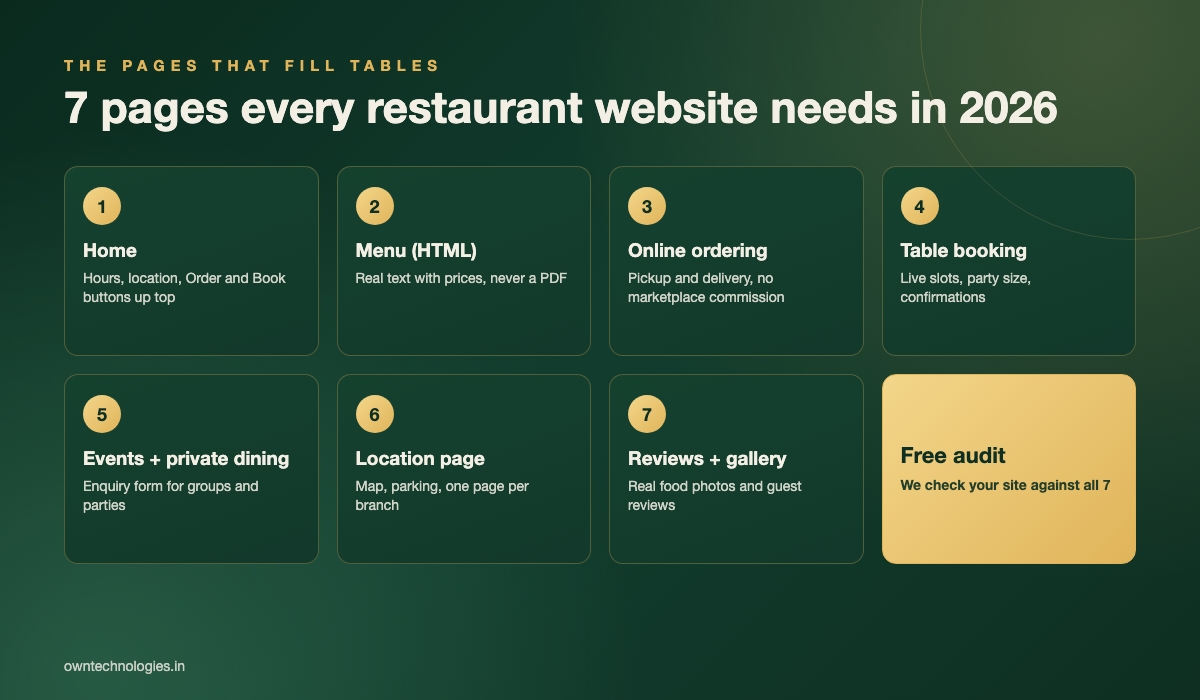
This guide covers what a restaurant website needs in 2026: the seven pages that fill tables, how online ordering and table booking should work, what a restaurant website costs, and the mistakes that quietly cost covers every night.
Why Your Restaurant Website Still Matters in 2026
Many owners assume Instagram, Google Maps, and delivery apps have replaced the website. They have not. They send traffic to it. Your Google profile links to your site, your Instagram bio links to it, and guests planning a birthday or office dinner almost always look for it before booking.
Your website is also the only channel you fully own. Marketplace apps take a commission on every order and keep the customer relationship. A website with its own ordering and booking lets you keep the margin and the guest’s contact details for the next visit.
| Channel | What it is good for | What you give up |
|---|---|---|
| Delivery marketplaces | Discovery by new customers | Commission on every order, customer data |
| Showing food and atmosphere | No ordering or booking of its own | |
| Google Business Profile | Local search, reviews, directions | Limited control over layout |
| Your own website | Direct orders, bookings, events, repeat guests | You pay to build and maintain it |
Page 1: A Home Page That Answers Three Questions
A hungry visitor wants to know three things in five seconds: are you open, where are you, and how do I order or book. Put today’s hours, your area, and two big buttons, “Order online” and “Book a table”, at the top of the mobile screen.
Below that, show a few signature dishes with real photos, a short line about your cuisine, and your review rating. Skip the full-screen video intro. On a phone with a weak signal it just delays the menu, and Google’s Core Web Vitals measure exactly that kind of slowness.
Page 2: A Real Menu, Not a PDF
The menu is the most visited page on almost every restaurant website. A PDF menu is hard to read on a phone, slow to load, and invisible to Google. Build the menu as a normal web page instead.
- Group dishes into clear sections with prices.
- Mark vegetarian, vegan, gluten-free, spicy, and common allergens.
- Add photos for your best sellers, not every dish.
- Let staff update prices and specials from a simple admin panel in minutes.
- Link every dish straight to online ordering where possible.
A text menu also helps search. People search for dishes, like “best biryani near me” or “vegan brunch”, and Google can only match your restaurant if the dishes are written on the page.
Page 3: Online Ordering Without the Commission
Direct online ordering is usually the biggest money-maker a restaurant website can add. Every order placed on your own site instead of a marketplace keeps the commission in your pocket and gives you the customer’s details.
What good restaurant ordering includes
- Pickup and delivery options, with delivery zones and minimum order values.
- Item options and add-ons, such as size, spice level, and extras.
- Online payment plus cash on delivery where your market expects it.
- Order confirmation and status updates by SMS or WhatsApp.
- Orders sent straight to the kitchen screen or printer, not an email inbox.
- A simple reorder button for returning customers.
Many restaurants send order updates on WhatsApp because guests actually read them. Our guide to WhatsApp Business API integration explains how that works.
Page 4: Table Booking That Confirms Instantly
“Call to reserve” loses bookings every evening, especially from younger guests and anyone planning after hours. Online table booking should show real available slots, take party size and any notes, and confirm immediately.
- Live availability by time slot and table size.
- Automatic reminders a day before and a few hours before, with a one-tap cancel link.
- Deposits for large groups or peak nights to cut no-shows.
- Guest notes for birthdays, allergies, and seating preferences.
You can use an existing reservation platform or build booking into your own system. We compare the approaches in our guide to booking and appointment software.
Pages 5 to 7: Events, Locations, and Reviews
Events and private dining
Group bookings, birthdays, and office parties are often your highest-value orders. Give them their own page with capacity, set menus or per-head pricing, photos of the space, and a short enquiry form that goes straight to the manager.
Location pages
Each branch needs its own page with address, map, hours, parking, phone, and a booking button for that branch. Add Restaurant structured data so Google reads your hours, cuisine, and location correctly.
Reviews and gallery
Show a handful of real guest reviews and a gallery of real food and interior photos. Guests trust your own photos far more than stock images, and a fresh gallery gives Instagram visitors a reason to stay.
Restaurant Website Cost in 2026
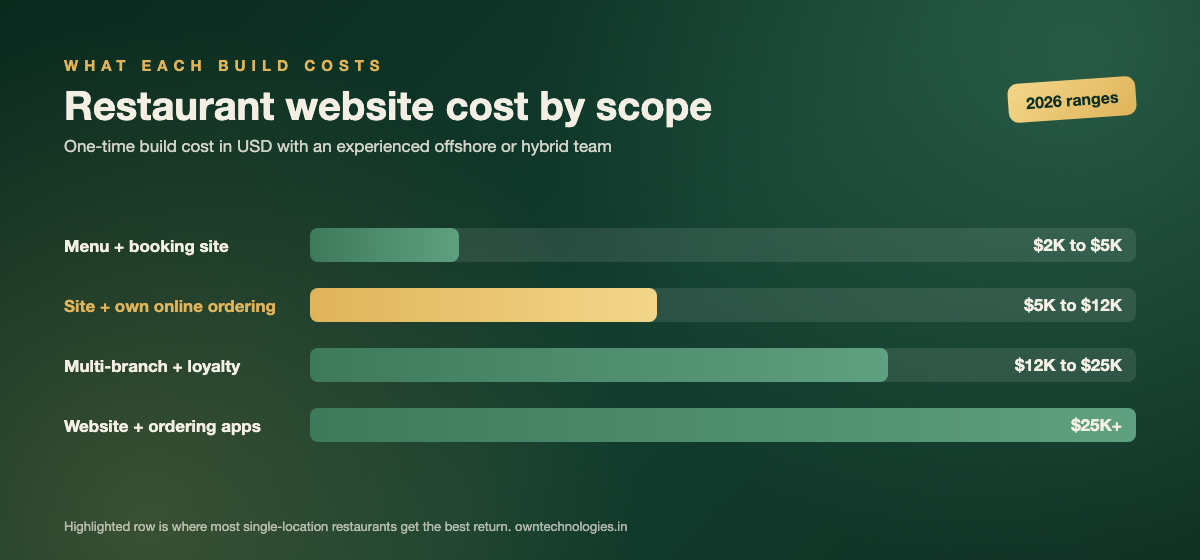
Cost depends mainly on whether you add your own ordering, how many branches you run, and whether you want apps. Typical ranges with an experienced offshore or hybrid team:
| Scope | What you get | Cost (USD) | Timeline |
|---|---|---|---|
| Menu and booking site | Home, HTML menu, table booking, location, gallery | $2,000 to $5,000 (around 1.7 to 4.2 lakh INR) | 3 to 4 weeks |
| Site plus own online ordering | Everything above plus ordering, payments, kitchen notifications | $5,000 to $12,000 (around 4.2 to 10 lakh INR) | 4 to 6 weeks |
| Multi-branch plus loyalty | Branch pages, central menu control, loyalty points, admin panel | $12,000 to $25,000 (around 10 to 21 lakh INR) | 6 to 10 weeks |
| Website plus ordering apps | iOS and Android ordering apps with push notifications | $25,000 and up (around 21 lakh INR and up) | 10 weeks and up |
Ongoing costs include hosting, payment gateway fees, SMS or WhatsApp messages, and small monthly updates for new dishes and photos. For a wider view of pricing, see our guide to custom website development cost.
Mistakes That Cost Restaurants Covers
- Out-of-date hours: one wasted trip turns into a one-star review. Keep website and Google hours identical.
- PDF menus: slow on phones and invisible to search.
- Ordering only through marketplaces: fine for discovery, expensive for regulars. Point repeat customers to your own ordering.
- No mobile testing: if the booking form breaks on an iPhone, the website is working against you.
- Hidden phone number: some guests still want to call. Make it one tap.
- Stock photos: guests want to see your actual food and room.
How OwnTechnologies Builds Restaurant Websites
We build fast, mobile-first restaurant websites with HTML menus, table booking, and direct online ordering, usually in 3 to 6 weeks depending on scope. For chains and busy kitchens, we add admin panels and CRMs for menu control, loyalty, and guest data, and native ordering apps when repeat orders justify them. Our SEO team can then help you rank for dish and area searches.
We have delivered 100+ projects over 8+ years for clients in 15+ countries, including the USA, Canada, UK, UAE, and Australia. See examples in our portfolio.
Frequently Asked Questions
At minimum: a home page with hours and Order and Book buttons, an HTML menu with prices, online ordering, table booking, an events or private dining page, a page per location, and real reviews and photos.
A menu and booking site costs about $2,000 to $5,000. Adding your own online ordering takes it to $5,000 to $12,000. Multi-branch sites with loyalty cost $12,000 to $25,000, and adding ordering apps starts around $25,000.
Yes, if you get regular repeat orders. Marketplaces are useful for discovery, but they charge commission on every order and keep the customer data. Your own ordering keeps the margin and the relationship.
Usually, yes. PDFs are slow and awkward on phones, harder to update, and Google cannot read them as well as a normal web page. An HTML menu with prices helps both guests and search rankings.
A menu and booking site takes 3 to 4 weeks. A website with online ordering takes 4 to 6 weeks. Multi-branch sites with loyalty take 6 to 10 weeks, and ordering apps take 10 weeks or more.
Final Thoughts
A restaurant website does not need to win design awards. It needs to answer “are you open, where are you, and what is on the menu” in seconds, then let the guest order or book without picking up the phone. Get the seven pages right, own your ordering, and the website becomes your most profitable table.
Want to see where your current site loses orders? Contact OwnTechnologies for a free consultation. We will review your website against all seven pages and send back a clear list of fixes, no commitment required.