Every founder now gets asked the same question in a board meeting or a sales call: “what is your AI story?” Most businesses do not need to build an AI app from scratch. They need to add one or two AI features to the app or website they already have, and know what that actually costs.
This guide breaks down the six AI features businesses are actually paying for in 2026, real cost ranges for each, and how to decide which one is worth building first.
AI App Development in 2026: The Short Answer
A single AI feature, such as a support chatbot or a recommendation engine, typically costs $3,000 to $25,000 (roughly 2.5 lakh to 20 lakh INR) when built on top of an existing app using an established AI API. A fully custom AI system trained on your own data, with its own model and infrastructure, runs $40,000 to $60,000 or more.
Demand for both is climbing fast. Statista’s global AI market data shows enterprise AI spend growing every year through 2026, and most of that spend is going into features bolted onto existing software, not brand new “AI apps” built from zero.
What “AI App Development” Actually Means for a Business
When a business owner says “we need AI,” they usually mean one of three things: a chatbot that answers customer questions, a system that recommends the right product or property to the right person, or a way to stop manually reading and typing data from documents. None of these require building a language model from scratch.
Most 2026 AI projects connect your app to an existing AI provider (OpenAI, Google, or Anthropic) through an API, then wrap it in your own workflow, your own data, and your own rules. The AI provider handles the “intelligence.” Your development team handles making it actually useful for your business. That is the part worth paying for. See our broader take in AI and machine learning trends in software development for how this shifted over the last year.
The Six AI Features Businesses Are Actually Building Right Now
These six show up in almost every AI scoping call we run in 2026, across industries.
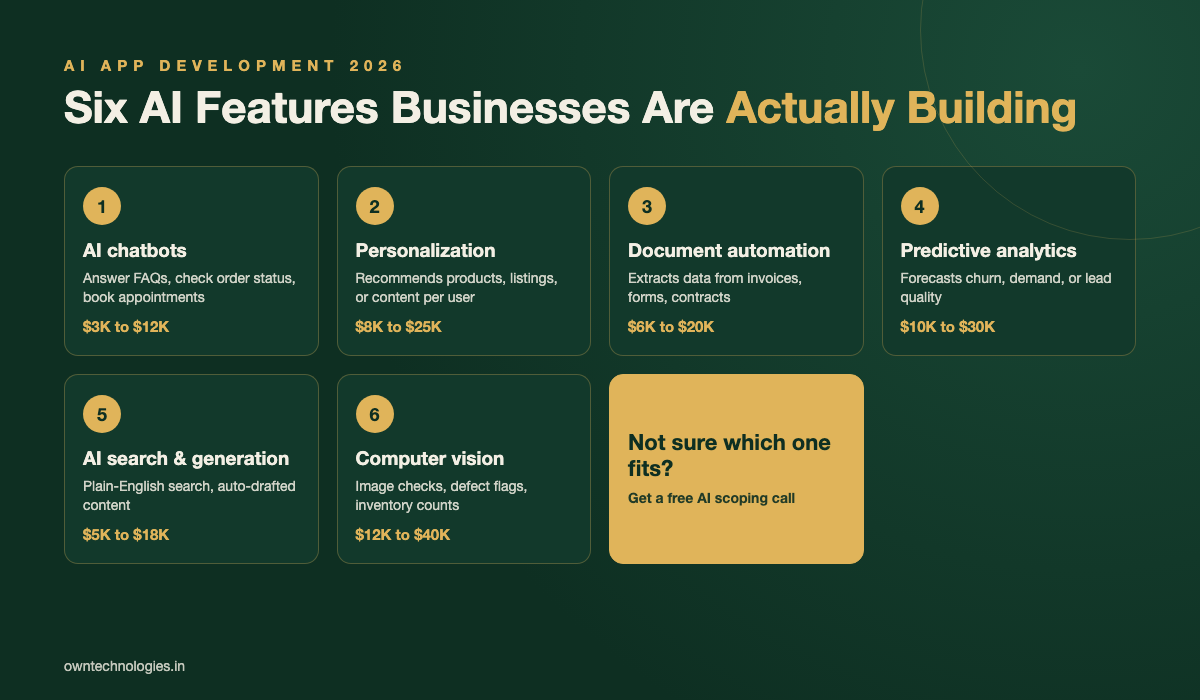
1. AI chatbots and support assistants
A chatbot that answers common questions, checks order status, or books an appointment inside your existing app or site. Cuts support tickets by handling repetitive questions instantly, day or night.
2. Personalization and recommendation engines
Suggests the right product, property, or content to each user based on their behavior. Common in e-commerce, real estate, and content platforms where more relevant results mean more conversions.
3. Document and data automation
Reads invoices, contracts, forms, or ID documents and pulls out the data automatically instead of someone typing it in. Popular with finance, healthcare, and logistics teams drowning in paperwork.
4. Predictive analytics and forecasting
Looks at your historical data to flag which leads will close, which customers might churn, or how much stock you will need next month. Needs clean historical data to work well.
5. AI search and content generation inside the app
Lets users search your app in plain English instead of exact filters, or auto-generates first drafts of listings, descriptions, or reports that a human then reviews.
6. Computer vision and image tools
Reads photos to check quality, verify a delivery, count inventory, or flag defects. Common in retail, manufacturing, and logistics apps.
| AI feature | What it does | 2026 cost range (USD) | Typical timeline |
|---|---|---|---|
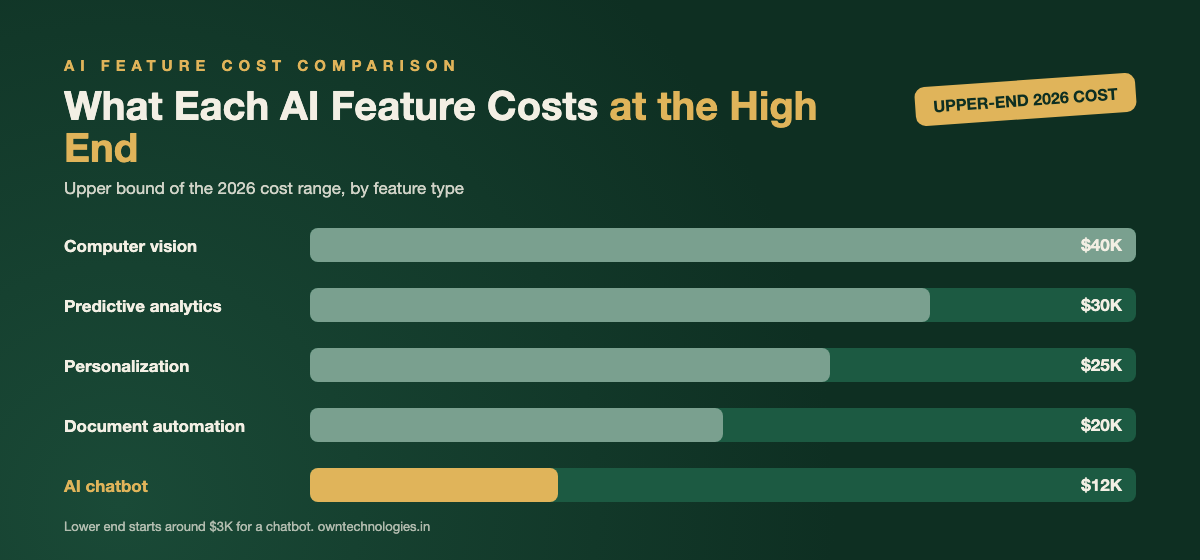
| Chatbot / support assistant | Answers FAQs, checks status, books appointments | $3,000 to $12,000 | 2 to 5 weeks |
| Personalization engine | Recommends products, listings, or content per user | $8,000 to $25,000 | 4 to 8 weeks |
| Document automation | Extracts data from invoices, forms, contracts | $6,000 to $20,000 | 3 to 7 weeks |
| Predictive analytics | Forecasts churn, demand, or lead quality | $10,000 to $30,000 | 5 to 10 weeks |
| AI search / content generation | Plain-English search, auto-drafted content | $5,000 to $18,000 | 3 to 6 weeks |
| Computer vision | Image checks, defect flags, inventory counts | $12,000 to $40,000 | 6 to 12 weeks |
What Drives the Cost of Adding AI to Your App
Model choice: API, fine-tuned, or fully custom
Calling an existing AI provider’s API is the cheapest path and covers most business needs. Fine-tuning a model on your own data costs more but gives sharper, more specific results. Training a fully custom model from scratch is rarely worth it unless you have a genuinely unique dataset, and it is the $40,000-plus tier.
Data readiness
An AI feature is only as good as the data behind it. If your records are scattered across spreadsheets and three different tools, budget extra time to clean and connect that data before the AI part even starts.
Integration complexity
Adding a chatbot widget to a website is simple. Wiring an AI feature into an existing CRM, ERP, or mobile app with live data, permissions, and user roles takes longer and costs more.
Usage-based API costs
Most AI providers charge per request or per token, similar to Google Cloud’s published Vertex AI pricing. For most small and mid-size apps this runs $50 to $500 a month, but it scales with usage, so budget it as an ongoing cost, not a one-time fee.
Compliance and data privacy
Healthcare, finance, and any app handling personal data need extra work to keep AI providers from storing or training on sensitive data. This typically adds 10 to 20 percent to the build.
Buying an AI Tool vs Building a Custom AI Feature
Off-the-shelf AI tools (a chatbot plugin, a generic recommendation widget) are fast to switch on and cheap to start, often $50 to $300 a month. They work well when your use case is generic and your data does not need to stay inside your own systems.
A custom-built AI feature costs more up front but plugs directly into your existing app, uses your actual data and business rules, and does not force your workflow to bend around someone else’s tool. It is usually the better choice once an off-the-shelf tool starts feeling like a workaround, or once you are paying for three separate AI subscriptions that should be one connected feature.
Where AI Features Are Already Paying Off
Real estate teams are adding recommendation engines that match buyers to listings automatically instead of a broker manually scrolling through inventory, a natural extension of the CRM work we cover in real estate CRM software features. Healthcare clinics are using document automation to pull patient details from intake forms in seconds. Retailers are using computer vision to check shelf stock from a phone photo instead of a manual count.
Many of the CRM builds we scope now include an AI layer by default, usually lead scoring or an assistant that drafts the first follow-up message so a sales rep only has to review and send it.
Common Mistakes Businesses Make When Adding AI
- Trying to automate everything at once. One well-built AI feature that actually gets used beats five half-finished ones.
- Skipping the data cleanup. An AI feature trained on messy, duplicate, or outdated data will confidently give wrong answers.
- Not budgeting for ongoing API costs. Usage-based pricing means your monthly bill grows as adoption grows. Plan for it.
- No human review step. AI-generated content, forecasts, or extracted data should have a quick human check before it reaches a customer, especially early on.
- Choosing the tool before the problem. Start with the business problem you are solving, then pick the AI approach, not the other way round.
How to Start Your First AI Project
- Pick one repetitive task. Something your team does the same way, dozens of times a week, is the easiest and safest place to start.
- Check your data. Confirm you have enough clean, relevant historical data to make the feature useful from day one.
- Prototype with an existing API first. Prove the idea works before spending on a fine-tuned or custom model.
- Add a human review step. Keep a person checking outputs for the first few weeks while you build trust in the results.
- Measure one number. Fewer support tickets, faster response time, or higher conversion. Pick it before you launch, not after.
Questions to Ask Before Hiring an AI Development Team
- Which AI provider will you use, and can I see the ongoing usage cost, not just the build cost?
- Will my data be used to train anyone else’s model?
- What happens if the AI provider changes pricing or shuts down that API?
- Do I own the code and the workflow, or only access to a tool you control?
- Have you built this type of AI feature for a business in my industry before?
What This Means for Your 2026 Roadmap
You do not need an “AI strategy” as a separate initiative. You need one AI feature, scoped against a real business problem, added to the app or CRM you already run. Start small, measure it, and expand once it is actually saving time or making money.
Frequently Asked Questions
Most single AI features, such as a chatbot or a recommendation engine, cost $3,000 to $25,000 in 2026 (roughly 2.5 lakh to 20 lakh INR) when built on an existing AI provider’s API. A fully custom model costs $40,000 or more.
Almost never. Most businesses get everything they need by connecting an existing AI provider’s API, such as OpenAI, Google, or Anthropic, to their own app and data. Training a custom model from scratch only makes sense with a genuinely unique dataset.
A support chatbot or a document automation tool that extracts data from forms and invoices. Both solve a clear, repetitive problem and can usually launch in 2 to 5 weeks.
Yes. AI providers charge per request or per token, similar to published cloud AI pricing. Most small and mid-size apps pay $50 to $500 a month depending on usage, and this grows as more users rely on the feature.
A chatbot or search feature typically takes 2 to 6 weeks. Predictive analytics or computer vision, which need more data preparation, usually take 6 to 12 weeks.
Final Thoughts
AI app development in 2026 is not about building the next ChatGPT. It is about picking one real problem in your business and connecting proven AI tools to your own data and workflow to solve it. Businesses that start small with one measurable feature are the ones actually seeing a return, not the ones chasing a broad “AI strategy.”
Not sure which AI feature would move the needle for your business? Talk to OwnTechnologies for a free scoping call. Tell us the one task your team repeats every day, and we will tell you honestly whether AI is worth it yet.