When someone searches “dentist near me” or “physiotherapy clinic open now”, they rarely scroll to your website. They pick from the three clinics in the Google map pack, based on stars, photos, and whether they can book in one tap.
This Google Business Profile for clinics checklist covers the 12 settings that decide whether your practice shows up in that map pack and gets the call. It applies to dental, physio, dermatology, aesthetic, and general medical clinics in the USA, UK, Canada, Australia, the UAE, and India. Most points take under an hour, and none of them need a paid tool.
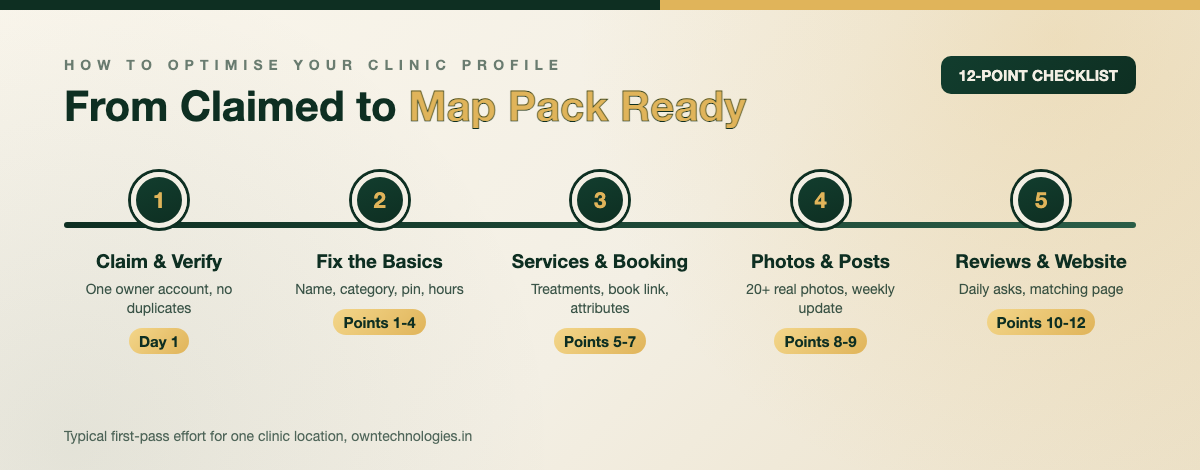
Why Your Google Business Profile Matters for a Clinic
For local healthcare searches, your Google Business Profile is often the first and only thing a patient sees. It shows your rating, hours, photos, phone number, and directions right in search results and Google Maps. A patient can call or book without ever opening your website.
Google says local results are ranked on three factors: relevance, distance, and prominence. You cannot change your distance from a searcher. You can change the other two, and that is what this checklist does. Google’s own tips to improve your local ranking confirm that complete, accurate profiles with active reviews rank better.
For clinics the stakes are higher than for most businesses, because patients often choose on trust signals alone:
- Star rating and review count: the fastest way a patient judges a clinic they have never visited.
- Real photos: a clean waiting room and a named doctor reduce the anxiety of a first appointment.
- Accurate hours: a wrong “open now” label sends an urgent patient to the clinic down the road.
- One-tap booking or calling: patients in pain do not fill long forms.
Before You Start: Claim and Verify the Right Profile
Many clinics have two or three profiles without knowing it: one created by a past receptionist, one auto-generated by Google, and one for each doctor. Search your clinic name and phone number on Google Maps and list every profile that appears.
- Claim the main clinic profile from an email the practice owns, not a staff member’s personal account.
- Add the practice manager and your marketing partner as managers rather than sharing the owner login.
- Complete verification. Google usually asks for a video recording showing your signage, the premises, and proof of management.
- Report true duplicates for removal. Keep individual practitioner profiles only if the doctor is publicly bookable in their own name.
If you are new to the platform, Google’s getting started guide in the Business Profile Help Centre walks through claiming and verification step by step.
The 12-Point Checklist at a Glance
| # | Checklist item | Time to fix | Impact |
|---|---|---|---|
| 1 | Business name matches your real signage | 5 minutes | High (avoids suspension) |
| 2 | Correct primary and secondary categories | 10 minutes | Very high |
| 3 | Address, map pin, and phone are accurate | 10 minutes | High |
| 4 | Regular, holiday, and appointment hours | 15 minutes | High |
| 5 | Services list with descriptions | 45 minutes | High |
| 6 | Booking link and website link with tracking | 15 minutes | Very high |
| 7 | Attributes and business description | 20 minutes | Medium |
| 8 | 20+ real photos of clinic, team, and equipment | 1 to 2 hours | High |
| 9 | One update post per week | 15 minutes a week | Medium |
| 10 | A steady system for asking for reviews | 1 hour to set up | Very high |
| 11 | Privacy-safe replies to every review | 10 minutes a day | High |
| 12 | A matching location page on your website | Half a day | High |
Points 1 to 4: Name, Categories, Address, and Hours
1. Use your real clinic name, nothing extra
“Smile Dental Clinic” is fine. “Smile Dental Clinic | Best Dentist Dubai Marina | Implants and Braces” breaks Google’s guidelines for representing your business and is one of the most common reasons clinic profiles get suspended. Keywords belong in categories, services, and your description.
2. Pick the most specific primary category
The primary category is the strongest relevance signal you control. Choose the most specific match: “Dentist” or “Cosmetic dentist”, “Physiotherapist”, “Dermatologist”, “Medical clinic”. Then add secondary categories only for services you really offer, such as “Dental implants periodontist” or “Sports medicine clinic”.
3. Check the address, map pin, and phone
Drag the pin to your actual entrance, especially in malls, medical towers, and business parks. Add the floor or unit number. Use a local number that rings at reception, not a call centre number that changes every few months.
4. Set every kind of hours
Add regular hours, holiday hours before every public holiday, and “More hours” such as appointment-only times or emergency hours. Wrong hours are one of the most common reasons patients leave a one-star review.
Points 5 to 7: Services, Booking Link, and Attributes
5. List every treatment as a service
Add each treatment patients search for: teeth whitening, root canal, Invisalign consultation, sports injury rehab, acne treatment. Give each a two-line plain-English description, and add a starting price where your local rules allow it. Services help your profile appear for treatment searches, not just “clinic near me”.
6. Add a booking link and track your website clicks
Add your online booking page as the appointment link, so a “Book” button appears on the profile. Add UTM parameters to your website link (for example ?utm_source=google&utm_medium=gbp) so your analytics show exactly how many visits and bookings come from the profile.
If you do not have online booking yet, it is worth building. We explain the options in our guide to booking and appointment software for service businesses.
7. Fill in attributes and the description
Attributes such as wheelchair accessible entrance, languages spoken, online appointments, and on-site parking show up as small badges patients notice. Your description has 750 characters: say who you treat, your main treatments, your area, and what makes the clinic different. No links, no phone numbers, no promotional offers.
Points 8 and 9: Photos and Weekly Updates
8. Upload real photos, and keep adding them
Stock photos of smiling models do nothing for trust. Upload 20 or more real photos, then add a few every month:
- The building exterior and entrance, so patients recognise it on arrival.
- Reception, waiting area, and treatment rooms.
- Each doctor and the front desk team, with names in the caption.
- Equipment patients care about, such as digital X-ray or 3D scanners.
- A logo and a cover photo sized correctly for the profile.
Never post photos of identifiable patients without written consent, and avoid before-and-after images where local advertising rules restrict them.
9. Post one update a week
Updates keep the profile active and give patients a reason to book: a new doctor joining, extended weekend hours, a seasonal check-up reminder, or a short answer to a common question. One post a week with a real photo is enough. Add a “Book” or “Call” button to each.
Points 10 and 11: Reviews Without Breaking Privacy Rules
10. Ask every patient, the same way, every day
Clinics with hundreds of reviews did not get lucky. They built a routine. Send a short WhatsApp message or SMS with your direct review link a few hours after each appointment, and put a QR code at reception. A steady flow of new reviews beats a burst of 50 in one week.
Do not offer discounts or gifts for reviews, and do not ask only happy patients. Both go against Google’s content policy and can lead to reviews being removed.
11. Reply to every review without confirming the patient
This is where clinics differ from restaurants. Even replying “we are sorry your root canal hurt” confirms that the reviewer is your patient and what they were treated for, which can breach patient confidentiality rules such as HIPAA in the USA. Keep replies general:
- Positive review: “Thank you for your kind words. Our team works hard to make every visit comfortable.”
- Negative review: “We take all feedback seriously. Please call our practice manager on the clinic number so we can look into this directly.”
- Never: mention treatments, appointment dates, or anything from a patient record.
Point 12: A Website Page That Matches Your Profile
Your profile links to your website, and Google compares the two. The page you link to should show the same clinic name, address, phone, and hours, list the same treatments, and load fast on mobile. Add MedicalClinic structured data or the more specific Dentist type so search engines connect the page to your profile.
Keep your name, address, and phone identical on directories too, such as Practo in India, Healthgrades in the USA, and local business listings. If your site is slow or thin, fixing it often lifts both map and organic rankings. Our guide to website speed, SEO, and conversions explains why.
Mistakes That Get Clinic Profiles Suspended or Ignored
- Keyword stuffing the name: adding “best”, city names, or treatments to the business name.
- Virtual office addresses: listing an address where patients cannot actually be seen.
- Duplicate profiles: several profiles for the same location competing with each other.
- Buying or gating reviews: fake reviews or filtering who gets the review link.
- Set and forget: a profile last updated two years ago with old hours and a departed doctor’s photo.
Most clinics see more calls and direction requests within 4 to 8 weeks of fixing these basics. Ranking in the top three for competitive searches takes longer and depends on your reviews and website.
How OwnTechnologies Helps Clinics Get Found
We audit your Google Business Profile, website, and directory listings together, because fixing one without the others leaves results on the table. Our SEO services start with a free SEO audit that shows exactly which of these 12 points your clinic is missing.
If your site is the weak link, our website development team builds fast clinic websites with location pages and online booking, usually in 3 to 6 weeks. For practices that want reminders, review requests, and patient follow-ups automated, our CRM development work connects it all. You can see past projects in our portfolio.
Frequently Asked Questions
Use your real clinic name, choose the most specific primary category, confirm your address, map pin, phone, and hours, list every treatment as a service, add a booking link, upload 20 or more real photos, post weekly updates, ask every patient for a review, reply to reviews without confirming patient details, and link to a matching page on your website.
Pick the most specific category that describes your main service, such as Dentist, Cosmetic dentist, Physiotherapist, Dermatologist, or Medical clinic. Add secondary categories only for services you actually provide.
Reply to every review, but keep replies general. Do not mention treatments, appointment dates, or anything that confirms the reviewer is a patient, since that can breach confidentiality rules such as HIPAA. For complaints, invite the reviewer to call the practice manager directly.
No. Google’s content policy does not allow incentives for reviews, and it also discourages asking only satisfied customers. Ask every patient the same way, for example with a WhatsApp or SMS message after each appointment and a QR code at reception.
Most clinics see more calls, bookings, and direction requests within 4 to 8 weeks of fixing the basics. Reaching the top three map results for competitive searches takes longer and depends on your review count, review activity, and website quality.
Final Thoughts
A strong Google Business Profile is not a one-time setup. Get the 12 points right once, then keep three habits going: new photos, a weekly update, and a review request after every appointment. That routine is what keeps a clinic in the map pack month after month.
Want to know where your clinic’s profile stands? Contact OwnTechnologies for a free SEO audit. Send us your clinic name and city, and we will reply with the checklist points you are missing and the fixes that will bring in the most calls first.