Most app projects go over budget for one reason: nobody wrote down exactly what “done” looks like before development started. A developer guesses, you assume something different, and the gap gets expensive to fix mid-build.
This guide gives you a free app requirements document template you can copy today, explains exactly what to put in each section, and shows how a clear document changes the quote you get from a development company.
What Is an App Requirements Document (and Why It Matters)
An app requirements document is a written description of what your app needs to do, who it is for, and how you will know it worked. It is not code and it is not a design file. It is the single source of truth both you and your developer point to when a question comes up mid-project.
Without one, every conversation about scope becomes a memory test. With one, a disagreement about whether a feature was “included” gets settled by reading a paragraph instead of arguing over email. That alone prevents most of the budget overruns we cover in our guide on why software projects go over budget.
Requirements Document vs Product Spec vs Technical Spec
These three terms get used interchangeably and that causes confusion. Here is the difference in plain terms:
- Requirements document (what this guide covers): written by you, the founder. Plain English, no code. Describes the problem, the users, and the features.
- Product spec: a more detailed version, sometimes written together with the developer, that adds user flows and wireframe references.
- Technical spec: written by the development team after your requirements document. Covers architecture, database structure, and API design. You should not need to write this yourself.
You only need to own the first one. A good development partner, like OwnTechnologies’ app development team, will turn your requirements document into the product spec and technical spec as part of the discovery phase.
The Real Cost of Skipping This Step
Founders skip the requirements document because it feels slower than “just start building.” In practice it is the fastest step in the entire project, usually one to three days of your time.
Skipping it costs far more later. A feature added mid-sprint because it was never written down typically costs 30 to 50 percent more than the same feature scoped from day one, because the developer has to unpick existing screens and logic to fit it in. A vague requirement like “it should have social features” can mean anything from a comment box to a full activity feed, and the two are weeks apart in build time.
Who Should Write It: You, Not Just Your Developer
You do not need technical language. You need to be specific about the business problem and the user, because you understand both better than anyone else. Handing a developer a one-line brief and asking them to “figure out the requirements” means they will guess at your business, and guesses get built into the quote as risk padding, which makes it more expensive.
If you already have a rough idea and want to move fast, our guide on building your MVP covers how to trim a requirements document down to the smallest version worth building first.
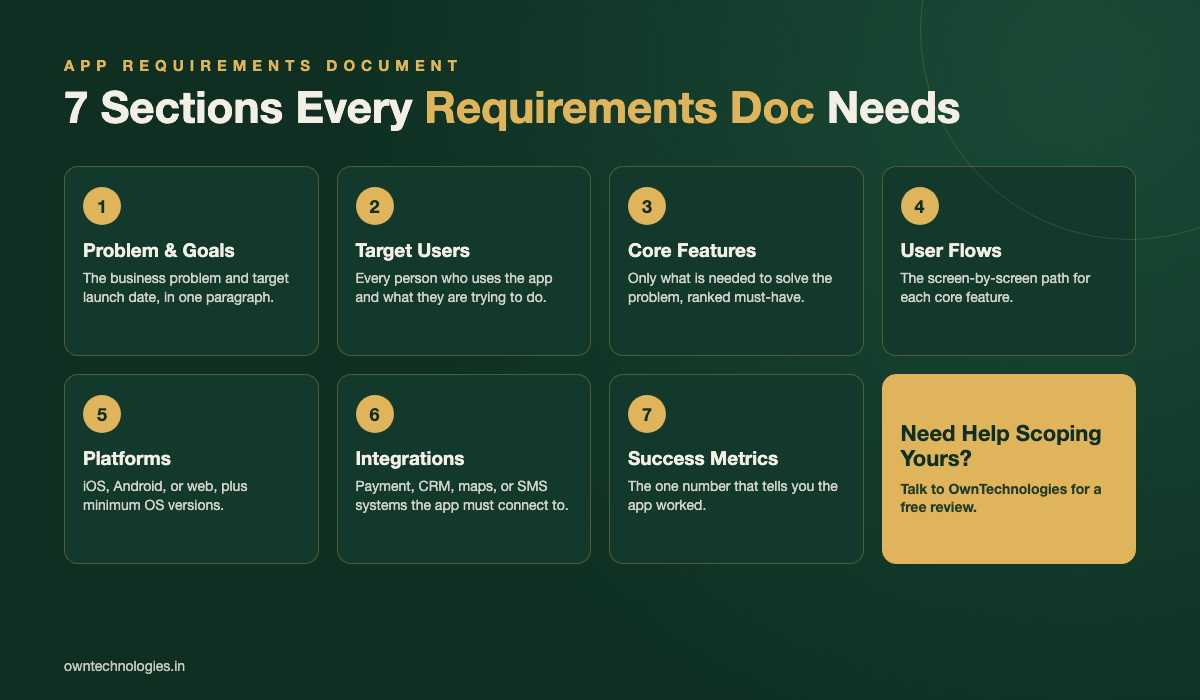
What to Include: The Sections Every Requirements Document Needs
Work through these in order. Each one answers a question a developer would otherwise have to ask you, or worse, assume.
- Overview: the problem, the business goal, and your target launch date in one paragraph.
- Target users: every type of person who will use the app, and what they are trying to do.
- Core features: only what is needed to solve the problem, marked must-have.
- Nice-to-have features: everything you want eventually but can launch without.
- User flows: the screen-by-screen path for each core feature, from open to done.
- Platforms: iOS, Android, web, or all three, plus minimum OS versions.
- Integrations: payment gateways, CRMs, maps, SMS, or any other system the app must talk to.
- Non-functional requirements: speed, offline behavior, security, and data rules.
- Success metrics: the number that tells you the app worked.
- Out of scope: a short list of things you are explicitly not building yet. This one line prevents more arguments than any other section.
Free App Requirements Document Template You Can Copy
Here is the same structure filled in with a real example, a booking app for a small salon chain, so you can see what “specific enough” actually looks like.
| Section | What Goes In It | Example |
|---|---|---|
| Overview | Problem, goal, target launch date | Booking app for a 3-location salon chain. Goal: cut no-shows by 30%. Launch Q2 2026. |
| Target users | Every user type and their goal | Customers (book fast), staff (see daily calendar), owner (view reports across locations) |
| Core features | Must-haves only, ranked | Book appointment, choose stylist, get reminder, cancel or reschedule |
| Nice-to-have | Phase 2 features | Loyalty points, gift cards, waitlist for full slots |
| User flows | Screen path per core feature | Home to Choose Service to Choose Stylist to Confirm to Reminder |
| Platforms | Devices and minimum versions | iOS 15+, Android 10+, no web app at launch |
| Integrations | External systems required | Stripe for payment, Twilio for SMS reminders |
| Non-functional | Speed, security, offline needs | Screens load under 2 seconds, customer data encrypted at rest |
| Success metric | The number that proves it worked | 20% fewer no-shows within 3 months of launch |
Copy this table into a blank document, replace the example column with your own answers, and you have a working requirements document. Frameworks like the one Atlassian outlines for product requirements follow the same logic at a larger scale.
How Much Detail Should a Founder Write?
Business-level detail: yours to own
Write in plain sentences about the problem, the users, and what success looks like. If you find yourself typing a database field name or an API endpoint, stop, that belongs to the developer.
Technical-level detail: leave it to the developer
You do not need to specify frameworks, database choice, or hosting. A good team will recommend these based on your requirements, not the other way around. If a vendor asks you to decide the tech stack before they will scope anything, that is a sign to keep looking.
5 Mistakes Founders Make Writing Requirements
- Writing features instead of problems. “Add a chat feature” tells a developer nothing about why. “Customers need to ask about availability without calling” leads to a better, often cheaper, solution.
- Listing every feature as must-have. If everything is priority one, nothing is. Rank ruthlessly, the nice-to-have list is not a rejection, it is phase two.
- Skipping the out-of-scope section. This is the section that gets skipped most and argued about most.
- Describing the app you saw somewhere else instead of your own users’ problem. “Make it like Uber” is a starting reference, not a requirement.
- Never updating it. A requirements document written once and never touched again stops being useful the moment scope shifts, which it always does.
How This Document Changes Your Development Quote
A vague brief gets a vague quote, usually a wide range with a lot of hedging language. A specific requirements document gets a specific, phased number, because the developer is pricing your actual app instead of a guess at it.
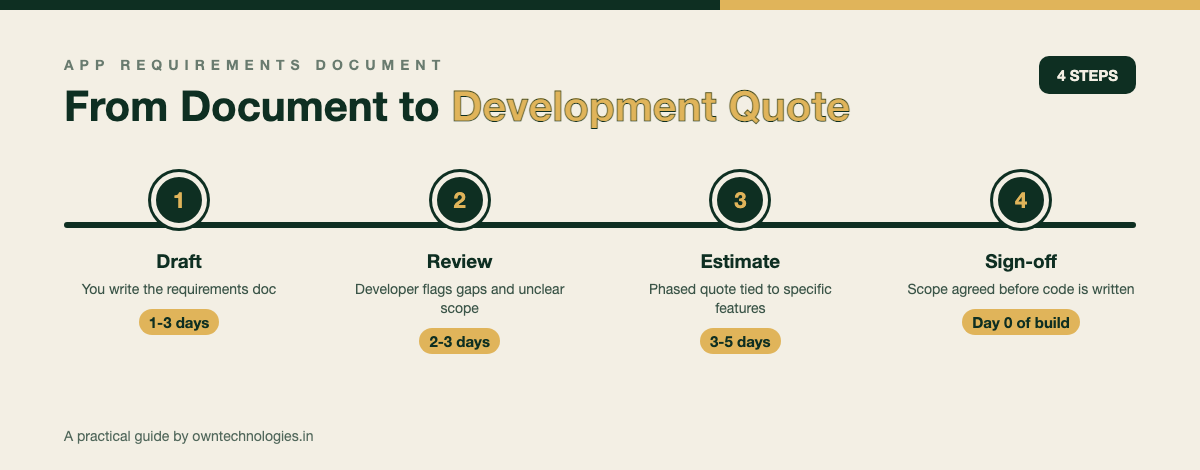
Expect the process to run in four steps: you draft the document in one to three days, the development team reviews it and flags gaps within two to three days, you receive a phased estimate tied to specific features instead of a single guessed number, and both sides sign off on scope before any code is written. This is roughly the same discovery process we describe for mobile app development cost, where clearer scope directly narrows the price range you get quoted.
Resources like ProductPlan’s breakdown of a product requirements document are written for in-house product teams, but the same logic applies to a founder scoping a first app: specificity is what makes an estimate trustworthy.
Updating Your Requirements Document as You Grow
Treat the document as a living file, not a contract carved in stone. Once your MVP launches and you have real user feedback, move two or three items from the nice-to-have list into a version 2 requirements document using the same template. Keep the original document too, it is useful history when a new developer joins the project and needs to understand why certain decisions were made.
If your app needs a companion website or customer portal down the line, scope that with the same structure and share it with your website development team early, so both projects can share a database and login system instead of being built twice.
Frequently Asked Questions
An app requirements document is a plain-English description of the problem your app solves, who will use it, which features it needs, and how you will measure success. It is written before development starts and used by both you and your developer as the single source of truth for scope.
Yes, an MVP still needs one, just a shorter version. List only the must-have features for your first release and move everything else to a nice-to-have section for version 2. Skipping it for an MVP is actually riskier, since a small budget has less room to absorb mid-build changes.
You should write the business-level sections: the problem, target users, features, and success metrics. Your development partner then adds the technical spec, such as architecture and database design, based on what you have written.
Most founder-written requirements documents run 3 to 8 pages. Length matters less than specificity. A 3-page document with clear, specific features beats a 20-page document full of vague statements.
You will likely get a wider, more cautious quote because the developer has to price in the risk of unknown scope. Mid-project changes also become more expensive, often 30 to 50 percent more per feature, because they were not planned for in the original build.
Yes, but treat any addition as a scope change, not a small tweak. Add it to the document, get a revised estimate for that specific item, and get sign-off before the developer builds it, rather than requesting it informally over chat.
Final Thoughts
An app requirements document is the cheapest insurance policy in the entire project. It costs you a few days of writing and it is the single biggest lever you have over your final budget and timeline, because it removes guesswork before anyone touches code.
Want a second pair of eyes on yours before you send it out for quotes? Talk to OwnTechnologies for a free scoping call. Send us your draft and we will point out gaps and send back a phased estimate within 48 hours, no commitment required.